Error when answering call

Status
Not open for further replies.

Lucken

Free User
Joined
Mar 24, 2023
Messages
11
Reaction score
0
- Call comes in
- We ckick on the Green button in the Windows App or button of the headset
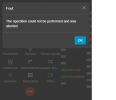
- app shows message: The operation could not be performed and was aborted
- communication happens then via the default audio devices of the PC and not via the headset
- Headset is Yealink WH66
- this morning installed latest update of the app and still same problem
 
Hi,

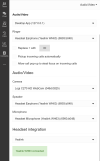
Show us this entire page from your Audio/Video settings so we can see how you are currently set up:
Make sure everythhing visible on my example is also shown on yours

1679664982955.png
 
Sorry, I cant see the top part above Audio/Video, can you scroll all the way up and show that too?
 
Thanks!

1, And can you tell us what OS you are using? (ie. Win 10 / Win 11)

2. Would it be possible to share a screenshot of the error message too please?
 
I'm using Windows 10 Pro with latest updates.

yealink.png
 
It sounds like the app cannot access the audio device for some reason.
We tested it here with the same model and it works perfectly, so I suspect something is happening on that specific PC you are using.

1. Try to disable the integration and switch the app to use other audio devices (ie. Realtek and maybe camera mic) - do calls work without any error there?

2. Unplug the Yealink USB cable from your PC, and also unplug it from the power. Then plug them back in and see if it starts working correctly. Does the problem go away if you do this?

3. Yealink has an app called "Yealink USB Connect" which can detect and upgrade your headset firmware. Try installing and running it to see if the hardware has any pending upgrades/fixes. Did it have any pending firmware upgrades?
 
1. This works fine if I set the yealink as defaults
2. Did not help
3. Everything up to date
 
1. This works fine if I set the yealink as defaults

Ah but for this I said to not use the Yealink and see if calls work.

If this works fine when you set the Yealink as default then I haven't understood why there is a problem :confused:

Can you clarify a bit please so I can better understand?
 
Sorry, I was unclear!
If I switch the app to other devices, then I can't use it as phone anymore! What i did was setting Yealink as default device in Windows. It is not ideal, but then it works.
 
In the mean time we updated to the latest version and i see it happen on all our PC's.
So it is not just on one system!
 
Hi Lucken,


If I switch the app to other devices, then I can't use it as phone anymore!
1. I realize that, and was not suggesting this as a solution but rather as a quick test just to see if the error goes away - so what was the result, does the error go away when you try this?


Meanwhile from our own tests here we can't replicate your issue, and given the amount of customers we have with these devices I would have expected at least a few reports of this. Just wondering now if there is something specific to your PCs that could cause this.

4. Do you have other apps running in the background, like Skype or MS Teams? Try to exit those apps and see if the issue goes away.

5. If you keep the Yealink selected in our app but only disable the integration setting does the problem go away?
 
4. Only MS Teams is running
5. We will test this now
 
Ok, try to quit MS Teams and test again - we know that Teams enables their headset integration by default and that will conflict with 3CX.

Also if the 3CX integration is turned off, then it will probably stop causing the issue since you won't have two apps simultaneously competing for the same device. That's something we saw other users facing in the past.
 
Hi, any news on this? You should also install our latest app because the one you are running now is outdated:

It should be 18.12.425
 
Swicthing of MS teams doesn't help. Latest version of the app is installed. Now turned integration off.
 
Please uninstall the app and reinstall the new version.

Let us know what happens on the latest version 18.12.425
 
I'm using 18.12.425 already!
 
Hi Lucken,

Are you still facing this issue often?
 
Status
Not open for further replies.

Forum statistics

Threads
112,327
Messages
591,904
Members
165,483
Latest member
AshleyStokes