Error when using SFTP recording backup with Azure blob storage

Status
Not open for further replies.

ChangeData

Customer
Joined
Jan 14, 2022
Messages
4
Reaction score
1
Hello,

We are using the SFTP capability from Azure Blob Storage. These SFTP credentials are used for backing up the recordings from our 3CX phone system.

The SFTP works fine when testing with Filezilla. When we test the recording backup system itself, it keeps throwing this error: (seemingly for each recording)

Code:
2022/02/14 17:34:10.245|6624|0027|Excpt|Renci.SshNet.Common.SshException: FeatureNotSupported: This feature is not supported.
   at Renci.SshNet.Sftp.SftpSession.RequestOpen(String path, Flags flags, Boolean nullOnError)
   at Renci.SshNet.Sftp.SftpFileStream..ctor(ISftpSession session, String path, FileMode mode, FileAccess access, Int32 bufferSize)
   at _3cxFilesystemImplementations.SFTP.SftpFolder.CreateFile(String name)
   at TcxRecordings.RecordingData.Archive()
   at _3cxSystemService.AutoArchiving.DoArchiving()

It looks the SFTP authentication works correctly. I am not really sure what goes wrong. Maybe someone knows what exactly is going wrong, and where we should look.

Thanks!
 
I can't provide a definite answer as it's not working with Azure SFTP as this particular storage type has not been tested with 3CX and therefore is not a supported method. There does exist another thread with a similar case that you might find helpful: https://www.3cx.com/community/threads/error-with-sftp-backup.87220/

That said, I am obligated to mention that we can't guarantee normal functionality or that it will work at all as per the above.
 
I can't provide a definite answer as it's not working with Azure SFTP as this particular storage type has not been tested with 3CX and therefore is not a supported method. There does exist another thread with a similar case that you might find helpful: https://www.3cx.com/community/threads/error-with-sftp-backup.87220/

That said, I am obligated to mention that we can't guarantee normal functionality or that it will work at all as per the above.
Ah yes, I did take a look at that thread.

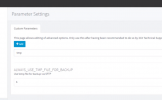
Do you know where I am supposed to add that parameter? I couldn't find any "parameters" on the settings page.

Thanks!
 
It should be in "Management Console >> Settings". If you can't see it, it either means your running a Hosted with 3CX Instance or you are not logged into the Management Console with the main admin account. Do you know if any of the two applies?
 
Ah yes that makes sense, I am currently not on an admin account. Let me try the parameter and report back.
 
  • Like
Reactions: ChrisC_3CX
Understood! Let us know how it goes!
 
Unfortunately that did not work. It still throws the same error.
 

Attachments

  • Screenshot 2022-02-15 182535.png
    Screenshot 2022-02-15 182535.png
    151.2 KB · Views: 35
Since as mentioned before this is not a tested scenario, all I can say you also try is restarting the 3CX Services and then trying again(after you've created the parameter), preferably during out of office hours to avoid downtime.

If you still cannot get it to work you might want to check out our guide for setting it up on a Debian machine: https://www.3cx.com/blog/docs/install-openssh-server-secure/
 
@ChangeData Did you manage to get this resolved? I'm facing the same issue with Azure Storage (SFTP).
 
Last edited:
@ChangeData Did you manage to get this resolved? I'm facing the same issue with Azure Storage (SFTP).
Have you also tried the above with no success?
 
Have you also tried the above with no success?
I have - it fixes the problem with backups, but not for recordings. When trying to archive any recording, it results in the error posted by OP above.
 
I see, well the workaround in the linked thread is for Backups so I would not expect it to do anything for Recordings, but as mentioned earlier the specific storage option is not a supported one so can't really guarantee functionality for neither backups nor recordings.
 
I believe the issue here is the timeout settings with Azure SFTP native to blob containers.

I have eventually got SFTP to work utilising Azure. I've had to use an Azure Container Instance to create an SFTP server backed by Azure Files - but It's now working.
 
  • Like
Reactions: ChrisC_3CX
Well that's good news! I'm sure this information will prove useful to others who are trying to accomplish the same so thanks for sharing!
 
Status
Not open for further replies.

Forum statistics

Threads
111,974
Messages
590,083
Members
164,901
Latest member
Silent_Guru