extension "0" for Receptionist on 3CX (16.0.8.9) with 3 digit extensions

Status
Not open for further replies.

PeterM

Premier Customer
Joined
Apr 28, 2021
Messages
30
Reaction score
7
Hi there.

I have what might be a silly question. Is there a way for me to setup receptionist with ext. 0 on my 3CX that is setup with 3 digit extensions?

Thanks
 
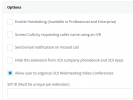
Enter 0 in the SIP ID of the extension - Options - Options

1628863407028.png

You may also have to enable 'Allow calls from/to external SIP URIs' under Settings - Network Settings - FQDN
 
You can utilize the Direct SIP via SIP URI by enabling it in "Settings >> Network >> FQDN". Then, as Saqqara mentioned, edit the extension and go to Options, scroll down and add 0 in the SIP ID field.

Do bear in mind that Direct SIP is not exactly designed for this scenario and will potentially open the 3CX PBX to direct external calls. I suggest giving the following a read before proceeding: https://www.3cx.com/docs/direct-sip/
 
  • Like
Reactions: Evolute IT
You can utilize the Direct SIP via SIP URI by enabling it in "Settings >> Network >> FQDN". Then, as Saqqara mentioned, edit the extension and go to Options, scroll down and add 0 in the SIP ID field.

Do bear in mind that Direct SIP is not exactly designed for this scenario and will potentially open the 3CX PBX to direct external calls. I suggest giving the following a read before proceeding: https://www.3cx.com/docs/direct-sip/
Does the 3CX FQDN provide DNS SRV records? If not, there shouldn't be any issues technically AFAIK.
 
Status
Not open for further replies.

Forum statistics

Threads
111,981
Messages
590,115
Members
164,908
Latest member
FarizQasimov