Solved Extension does not show in Que

Status
Not open for further replies.

Ed Grassere

Joined
Mar 24, 2021
Messages
49
Reaction score
12
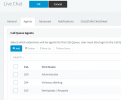
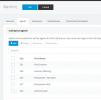
';I have a problem that Extension nr 200 doesn't show up in the Que WACHTRIJ and LIVE CHAT.
Nr.200 is member of both Que's but doesn't show in the switchboard that it is and also doesn't respond to the que's
As you can see in the screen-shot of the switchboard

Any idea what could cause this?
 

Attachments

  • Knipsel.PNG
    Knipsel.PNG
    10.2 KB · Views: 2
  • chat.PNG
    chat.PNG
    16.3 KB · Views: 2
  • wachtrij.PNG
    wachtrij.PNG
    18.9 KB · Views: 2
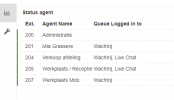
The user might be explicitly logged out of the queue. A manager can log them back in.
 
Thank you for your answer, i m a manager in the system how can i log the member in?

I just saw it at the 3CX Portal... users STATUS... there this user was logged out... now back in it works.
Thank you for your support.
 
The member and the manager can login/logout using the queue switchboard. Choose your queue and you'll see the list of agents, then there's a link "Logged in" or "Logged out", which you can click to toggle the status.

The other way is as you did, through the console using the Status button.
 
  • Like
Reactions: VasilisV_3CX
  • Like
Reactions: Ed Grassere
Status
Not open for further replies.

Forum statistics

Threads
111,974
Messages
590,081
Members
164,899
Latest member
mazet