Extension Forwarding to Mobile CID/CNAM

Status
Not open for further replies.

gigaboy

SOHO User
Joined
Jul 6, 2016
Messages
90
Reaction score
3
I have one extension set so that after several seconds of ringing, it will auto forward and start ringing the mobile number. This works well. I do NOT have the "ring my mobile simultaneously" checked.

An annoyance however is that once forwarded to mobile, the display on the mobile device shows "Restricted" and not the CID/CNAM of the caller. We've verified that the CID/CNAM is coming to the deskphone, but its not being passed, or being stripped out. Any setting(s) that would fix this?
 
Hi,

Which provider are you using?
 
There are outbound options that deal with where outgoing caller ID is to be taken from, in 3CX, in the trunk outbound settings. It may need to be "adjusted" for your particular provider. Your provider must also allow a caller ID other than one that is registered with them. (note the current settings, before making any changes or all outbound calls may fail) You may be able to get the number to be passed on, but perhaps, not the name.

If you use the ring my mobile at the same time, does it work?
 
As Telnyx is a supported provider the included template is adjusted to present the "Originator CallerID" so make sure you are using the default template for Telnyx.
 
I suspect that there still may need to be some changes in the outbound parameters. In their guide, it really doesn't seem to mention the settings (says.. custom field), required to pass on the original caller ID.
They are mentioned in this post, at the end...
https://www.3cx.com/community/threads/outbound-calls-display-custom-number.59304/

This will vary from provider to provider, so what works with one, may not work with yours. You may have to do some testing, but make note of the original settings, as some changes can prevent all outgoing calls.
 
So is the template set from the dropdown in the ADD "SIP trunk Provider in Your Country" selection? Or something else.?10088
 
Correct. That is the template
 
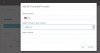
The template as provided by 3cx did not work, still got the "Restricted" message. What DID work was to change Remote Party ID - Calling Party : User Part from "Leave default value" to '"Originator Caller ID" Original Caller number will be sent'
 

Attachments

  • SIP Trunk Outbound Changes 1.jpg
    SIP Trunk Outbound Changes 1.jpg
    28.5 KB · Views: 10
Status
Not open for further replies.

Latest Posts

Forum statistics

Threads
111,918
Messages
589,736
Members
164,792
Latest member
LBS Care