Extension Hours

Status
Not open for further replies.

Heath

Customer
Advanced Certified
Joined
Aug 12, 2017
Messages
287
Reaction score
3
In the management portal, I remember that I can set hours for a particular extension under the forwarding rules, instead of an extension using the global hours.. Am I missing something, as I do not see it anymore, or any option to enable to disable autoswitching. I have 2 extensions that I need to set its own available and DND hours outside out global hours, but I do not see where to do that.
 
Since Update 4 it has been relocated to the webclient or Desktop App of the extension.
 
  • Like
Reactions: Evolute IT
ok. Well it should be reflected in the forum, but what if an extension doesn’t have webclient or desktop app and uses IP phone. How then can an extension hours be updated. Also I remember being able set specific hours for the digital receptionist and for ring group. How do I update those
 
There is no way to change office hours via the IP Phone, you will have to log in to the extension via the web client or a provisioned Desktop App.
Ring groups and IVRs do not have specific hours, however you can achieve the same result through using a dummy extension.
 
  • Like
Reactions: Evolute IT
I have scoured the management console and have not found anything of the like, it must only be on the web client side now. I will have to log in to my clients' web view to change their specific hours, correct? It would be nice if there was a guide or something similar to help me through this, if there is please let me know how to find it.
 
Yes, you will have to log in to the web client for the extension. The web client password is listed in the welcome email.
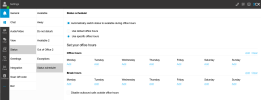
In the web client you can navigate to Settings > Status > Status Scheduler:
statusscheduler.PNG
and set office hours as needed.
 
  • Like
Reactions: Evolute IT
There is no way to change office hours via the IP Phone, you will have to log in to the extension via the web client or a provisioned Desktop App.
Ring groups and IVRs do not have specific hours, however you can achieve the same result through using a dummy extension.
I remember either ring group or IVR a few years ago was able to have certain hours.
 
I remember either ring group or IVR a few years ago was able to have certain hours.
Maybe you are thinking of inbound rule hours (that lead to a RG or DG)
ok. Well it should be reflected in the forum,<snip>
(Grabs popcorn)

3CX has decided to move lots of settings to the webclient in the next few updates for many reasons. They have stated they will provide a way for an admin to login as the user without needing to know the password in the future, but it's not ready today.

In short, the settings location has been moved, the setting will still exist, and it will be easy to get to in the future.

For more information the beta and RC threads, while being long, has this discussed at length.

I'd read these posts for more info:
https://www.3cx.com/community/threads/update-4-new-‘receptionist’-view.115359/post-534452
https://www.3cx.com/community/threa...nist-view-status-scheduler.114872/post-533351
https://www.3cx.com/community/threa...ew-status-scheduler.114872/page-6#post-533298
https://www.3cx.com/community/threa...ew-status-scheduler.114872/page-6#post-533266
https://www.3cx.com/community/threa...ew-status-scheduler.114872/page-6#post-533027
https://www.3cx.com/community/threa...ew-status-scheduler.114872/page-3#post-532387
https://www.3cx.com/community/threa...nist-view-status-scheduler.114872/post-532244

EDIT: Added more links
 
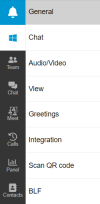
Maybe I need new glasses, but I don't see the status in the webclient settings.
I only see this:
1658480345934.png

Version is
1658480391285.png
And it's gone in the admin console.
 
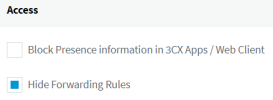
Found it. You have to change the phone provisioning setting of the user in the admin control panel: (User->tab Phone Provisioning->Access).

1658481241422.png
 
"
There is no way to change office hours via the IP Phone, you will have to log in to the extension via the web client or a provisioned Desktop App.
Ring groups and IVRs do not have specific hours, however you can achieve the same result through using a dummy extension."

Ladies and Gentlemen, this is a massive step back for system administration.

We use extension times for inbound call routing and summer / winter hours on a half dozen lines in one office. So instead of doing a two minute edit through the admin console to amend times on each line we must now:

- change email on the ext to something we can access
- send welcome email to ourselves
- log in with those credentials on the webclient
- amend the times

then repeat five more times for each inbound line!? That's one office, we have five more with even more complex call flows. How is this better in any sense?

The admin console is supposed to centralize system administration. Taking these controls off the admin console and putting them on individual extensions is simply dumb. This will result in longer turn around times on tickets, have more steps to screw up and Lord help you if email is down in a DR scenario where you are trying to close an office phone lines due to tech issues.

We also have users who we do not want to define their own extension times because they will go straight to DnD mode eight hours a day once they realize they can.

The is a "feature" no sane PBX administrator would ever ask for and it needs to be reversed as soon as humanly possible.
 
we must now:

- change email on the ext to something we can access
- send welcome email to ourselves
You can simply select the extension(s) from the Users tab in the management console and click on Export. After opening the CSV file you will find the webclient password under 'SrvcAccessPwd' column.

We also have users who we do not want to define their own extension times because they will go straight to DnD mode eight hours a day once they realize they can.
Doing this, from the user's perspective, is not very different from manually changing to DnD or just not picking up the phone ;)
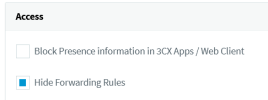
Furthermore, you can prevent this by checking 'Hide forwarding rules' under the phone provisioning tab of the extension:

1658925689052.png

The is a "feature" no sane PBX administrator would ever ask for and it needs to be reversed as soon as humanly possible.
It will be updated in Update 6, view https://www.3cx.com/community/threads/auto-switch-based-on-time-dissapeared.115247/post-534764 .
 
Hi @pangel

The point is, if a system needs third-party email support or Excel export functions to do something we used to be able to do directly through the admin interface, it's a badly designed admin interface.

Thank you for your link indicating this will be fixed.
 
This is DEFINITELY a step-back and has created a uneccesary work load for administrators for something that was previously easily done. :((
Cannot wait for ver .6 update to get this back centrally manageable.
 
I am sure I was able to set the status schedule for each user. And I can see that I did. Now after a few month I have to change it for a user and could not find the menu button for the life if it.

Do I understand correctly that I can't do that for users anymore they have to do that themself?

I am using 18.0 Update 4 (Build 965)
 
Yes, I also don't like it, it's really a problem for us, since we also have extensions in use as service extensions.
 
Status
Not open for further replies.

Forum statistics

Threads
111,974
Messages
590,081
Members
164,899
Latest member
mazet