Extension Name Delivery when calling other extensions

varietel

Bronze Partner
Basic Certified
Joined
Oct 29, 2010
Messages
29
Reaction score
0
I just upgraded to V20 and since then the extension names are not displaying on the called extension. It worked before the upgrade. Any suggestions on what needs to be changed in the new config?
 
Where are the names not displayed? Phone, web client, softphone, mobile app?
 
the user first and last name is not being displayed on other phones when being called. This is a hotel and they rely on the room phone names to be displayed on the Front Desk and Concierge phones. thanks.
 
Same issue? Priority as to where the name exists? Activity Log showing name in INVITE, or not?

 
Thank you leejor. There was not a resolution to this in that thread. Is there a way for the 3CX to send the user name and not rely on the phones to do it? V18 worked perfectly.. Seems like there alot of those things not supported in V20 anymore that v18 did perfectly. Why lose them??
 
Hi,

Can you please let us know what phone models, firmware and provisioning method/path you are using? Without this info it's not really possible to comment or help troubleshoot.

Thanks,
Kyriacos
 
Using Yealink T48G v35.83.0.136, T48S v66.86.0.15. Provisioned via the 3CX automatically, on site server. Thanks so much.
 
Using Yealink T48G v35.83.0.136, T48S v66.86.0.15. Provisioned via the 3CX automatically, on site server. Thanks so much.

I have provisioned both those models (using our default templates), and they both show the name of the caller just fine for both internal and external calls.

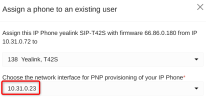
You said you have an on site server, so delete the phones, reset them, and assign them fresh via PnP again.

Tip: Both phones are end of life models, so choose the IP when you provision them because they are probably failing to load the phone book right now.

1776927548551.png

Note: Your T48S firmware has an update available.
 
ok, thanks.. I'll try this.. It looks like the names are coming from a old Phone book but there is not a company phonebook setup in the system. where would that be coming from? Thanks again for the direction.
 
Anyone have any insights on how to turn off the phone book or clear it out? thanks
 

Latest Posts

Forum statistics

Threads
112,280
Messages
591,668
Members
165,400
Latest member
georgi