- Joined
- Nov 30, 2012
- Messages
- 5
- Reaction score
- 1
Hi All,
I can not get an extension to follow its Auto Switch or Status. I have different IVR options based on Time Conditions.
Everything should follow Inbound Rules. I have no specific office hours for the time condition. I do not have global office hours set. Office hours are set only on the extension.
Inbound Rules --> Extension
If Available --> IVR 800
If Break/Lunch --> IVR 810
If Outside Office Hours --> IVR 806
I'm working with a dummy extension that does not have a phone attached/registered. I've also tried adding a forwarding number so that the extension shows active.
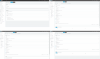
The problem is that I can not get the Lunch or Outside Office hours IVR to play at their respective times. In forwarding rules under Lunch status I have FWD to Extension (IVR 810). Away status is set to IVR 806. It seems that the system just follows whatever the available status settings are and doesn't regard any other status. I can get the lunch message to play if I set the Available status -- External Calls to the IVR 810 but at the end of day time it will just play the same IVR 810 message and not the IVR 806 message. Is there something different I'm supposed to be doing here ?
I can not get an extension to follow its Auto Switch or Status. I have different IVR options based on Time Conditions.
Everything should follow Inbound Rules. I have no specific office hours for the time condition. I do not have global office hours set. Office hours are set only on the extension.
Inbound Rules --> Extension
If Available --> IVR 800
If Break/Lunch --> IVR 810
If Outside Office Hours --> IVR 806
I'm working with a dummy extension that does not have a phone attached/registered. I've also tried adding a forwarding number so that the extension shows active.
The problem is that I can not get the Lunch or Outside Office hours IVR to play at their respective times. In forwarding rules under Lunch status I have FWD to Extension (IVR 810). Away status is set to IVR 806. It seems that the system just follows whatever the available status settings are and doesn't regard any other status. I can get the lunch message to play if I set the Available status -- External Calls to the IVR 810 but at the end of day time it will just play the same IVR 810 message and not the IVR 806 message. Is there something different I'm supposed to be doing here ?