Extension sent to SIP Trunk in invite

Status
Not open for further replies.

aschildmeyerSTR

Premier Customer
Joined
Jan 28, 2021
Messages
93
Reaction score
45
3CX Enterprise- 16.0.8.9
Provider - Telnyx
Country - USA 10 Digit
Fanvil X5U Phone

Error - from Telnyx
  • D35 - 403 Invalid Caller Origination Number D35 - Caller Origination Number is Invalid. The Caller ID in your SIP INVITE is not valid. Our caller ID policy is explained in more detail here. In short, please make sure your FROM/PAID/RPID headers contain +E.164 number formats.

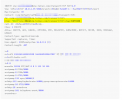
My issue is super rare as it's only happened twice in 1 week from a few thousand calls. My user can call the person again and everything works as expected. From what the Telnyx logs show me as received is the following -

1621027712618.png

1621027241619.png

As you can see my Originating caller id is missing some things. The number should have been +1areacode6768024 but it shows as 448024 so I'm not sure how it got the extra 4 in there either but from the first picture you can see the invite was sent to telnyx using the extension rather than +E164 phone number.

Caller ID is handled at the extension level in my system and every Caller ID is setup as +1########## format. Every other layer where a callerID can be applied is blank.
 
Last edited:
Unless it happens from certain extensions, and can be replicated, you will have to track down, under what circumstances this occurs. The fun of intermittent problems.

It may be that the extension number is originating from a setting in the set (device) itself, and is overriding the 3CX caller ID setting.
 
@aschildmeyerSTR

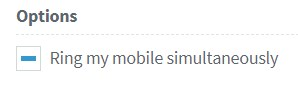
If you are absolutely sure that all Outbound Caller ID fields that are populated use the E164 format, you might want to check for the "Ring my mobile simultaneously" option on the "Available" and "Custom 1" profile statuses of every extension. If you detect any extensions that have this option enabled and also have an external number set as their mobile, try calling them to see if you can reproduce the issue.
 
  • Like
Reactions: jed
@aschildmeyerSTR

If you are absolutely sure that all Outbound Caller ID fields that are populated use the E164 format, you might want to check for the "Ring my mobile simultaneously" option on the "Available" and "Custom 1" profile statuses of every extension. If you detect any extensions that have this option enabled and also have an external number set as their mobile, try calling them to see if you can reproduce the issue.
Thanks @ChrisC_3CX. I'm 100% sure that the Outbound Caller ID fields are populated with E164. Again it's super rare and this user makes lots of calls with no issues, except this super rare one.

In this case the user making the call does not have "Ring My Mobile Simultaneously" marked. Are you saying any other extensions with that flag marked could cause this issue for the impacted user that does not have it marked?
 
In this case the user making the call does not have "Ring My Mobile Simultaneously" marked. Are you saying any other extensions with that flag marked could cause this issue for the impacted user that does not have it marked?
Yes, it may be a case that the affected user is calling another extension that has this setting enabled.

However, for your case, I'd recommend trying to identify exactly in which scenario this is happening so that we can look into it further.
 
  • Like
Reactions: jed
Yes, it may be a case that the affected user is calling another extension that has this setting enabled.

However, for your case, I'd recommend trying to identify exactly in which scenario this is happening so that we can look into it further.
I'm using the default Telnyx supported profile and I see that outbound parameters are set to the following.
1621446872751.png
I'm going to try and switch those to be CallerID from the extension settings instead to see if it helps. I for sure tested the scenario of "Ring my mobile simultaneously" from an internal extension to another extensions mobile and that does cause the Original issue that I see. But the original issue wasn't doing that same scenario it was calling an external number that wasn't associated at all with 3CX.
 
Setting the Outbound Parameters to OutboundCallerID taken from the extension level will most likely get rid of the issue all together, but do bear in mind that you will lose the functionality of having the originator caller id being sent outward in the even that you receive an incoming call and route it out again. Your PBXs Outbound Caller ID will be sent out instead.

If "Ring my mobile simultaneously" is indeed causing the issue, you could check if any extension has it enabled by navigating to Extensions, click on the first checkbox to select all extensions, edit, go to "Forwarding Rules" and check the state of the "Ring my mobile simultaneously" option. If it appears as below:
1621498441727.png
It means that at least one extension has it enabled. You might want to consider disabling it completely. Do remember to check both the "Available" profile status and the "Custom 1" profile status (default name: Lunch)

If you are certain the issue you are facing is not related to this setting, please try and identify the exact scenario so that we can look into it.
 
Setting the Outbound Parameters to OutboundCallerID taken from the extension level will most likely get rid of the issue all together, but do bear in mind that you will lose the functionality of having the originator caller id being sent outward in the even that you receive an incoming call and route it out again. Your PBXs Outbound Caller ID will be sent out instead.

If "Ring my mobile simultaneously" is indeed causing the issue, you could check if any extension has it enabled by navigating to Extensions, click on the first checkbox to select all extensions, edit, go to "Forwarding Rules" and check the state of the "Ring my mobile simultaneously" option. If it appears as below:
View attachment 22085
It means that at least one extension has it enabled. You might want to consider disabling it completely. Do remember to check both the "Available" profile status and the "Custom 1" profile status (default name: Lunch)

If you are certain the issue you are facing is not related to this setting, please try and identify the exact scenario so that we can look into it.
Good information @ChrisC_3CX I was looking for what that would change would do as a negative effect. Since the other option is disabling it all together potentially, would the stance be then to just use the mobile app? I mean I tell my people to use it anyways as they'll have a better experience and I can track calls better. But I still have some people used to the old ways... But if it is the recommendation not to use that flag I will push harder to get people to use the mobile app.
 
Ideally you would indeed have users use the 3CX mobile client instead, yes. Though, depending on what the scenario is, you could also use call forwarding instead of "Ring my mobile simultaneously". If for instance you are using "Ring my mobile simultaneously" to be able to reach users who may have left the office, you could instead have them change to a different profile status before leaving, such as DND, which will be configured to forward calls to their mobile numbers.
 
Status
Not open for further replies.