Solved External calls going to attendant.

Status
Not open for further replies.

chaznsc

Customer
Joined
Jan 22, 2016
Messages
32
Reaction score
2
This weekend I got notification that our 3CX SSL Cert was renewed. This morning, all external calls are going to the after hours attendant. I have checked what I know to check, performed all updates with not luck. I am not blaming the SSL certificate, but Friday the system was working as normal.

Version 16.0.619


Help!
 
Check if someone forced the phone system to Out of Office:

Dial Codes

Check the server's Date/Time, office hours, and holiday schedule, and inbound rules
 
I have looked everything over and cannot seem to find a culprit. Where can I see if the system is OoO?

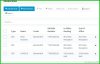
Attached is the inbound rule table. If I dial the 851 it goes straight to the auto attendant.


2020-08-03_12-03.jpg.
 
Does the 3CX Activity Log say why the call is going there?
 
Here is the AL from a call I just made from my cell to the office. I changed the IP's to protect the innocent :)

08/03/2020 12:30:48 PM - [CM102001]: Authentication failed for AuthFail Recv Req REGISTER from xxx.xxx.xxx.xxx:64628 tid=544794609 Call-ID=427782243-326321108-1932601353: REGISTER sip:ccc.ccc.ccc.ccc SIP/2.0 Via: SIP/2.0/UDP 100.64.36.3:64628;branch=z9hG4bK544794609;received=yyy.yyy.yyy.yyy Max-Forwards: 70 Contact: <sip:[email protected]> To: <sip:[email protected]> From: <sip:[email protected].181>;tag=1498204690 Call-ID: 427782243-326321108-1932601353 CSeq: 2 REGISTER Proxy-Authorization: Digest username="3686",uri="sip:bbb.bbb.bbb.bbb",algorithm=MD5,realm="3CXPhoneSystem",nonce="414d535c1538ccb803:dda8a2596470d055fb42b8a9119ebfa0",response="cd7db93dab6ec04704fada82dbefb97c" User-Agent: Avaya IP Phone 1120E Content-Length: 0 ; Reason: Credentials don't match, check that authorization-ID and password match the ones in extension settings
 
Last edited:
That looks to be a failed extension registration attempt.
 
So where do I start troubleshooting this?
 
If your system is very busy, it might be best left until a quiet time.

You'd have to find the initial Invite, from your provider, for the incoming call. That call will have an identification number, assigned by 3CX, that will help identify all additional logs (messages) relating to that one call. Track that though until it reaches the final destination.
 
Hi,

1. Follow the link @voiptoys posted first.

Do not continue troubleshooting unless you first hear the message "3CX phonesystem is now using the default office hours"

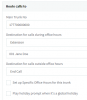
2. Look at your trunk's General Settings (not the inbound rules)

1596545589001.png
If this goes to the attendant then you probably got calls that ended in the catch-all scenario instead of the inbound rules.

3. Ensure you are not actually running in a global holiday. check the trunk settings for this, and also check the system's Timezone & Office Hours Settings. If the calls end up here, you will hear whatever the HOL attendant has defined, so check HOL in your Digital Receptionist page too and see what message is set there
 
Our dial codes do not match the 3cx manual. Additionally, my trunk settings are set to the extension.
 
Hi,

1. That's not a problem, you can use your own dial codes. If you set *11 for example then simply dial *11

2. If they go to the extension that plays the message during in and out of office hours then check your inbound rules. Perhaps the provider is sending something that doesn't match the rules so you end up going to the extension in question.

3. How about the global holiday?
 
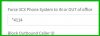
I dotn see any holidays with active dates. And when I set up the dial code *4114 and dial it, it tells me I have disabled voicemail for my extension. Do the DC's work from any extension?2020-08-04_10-28.jpg
 
*4 belongs to voicemail so please try something different that will not conflict (perhaps *9 for example)

*4114 = contact the voicemail of extension 114
 
Are your DIDs UK mobile numbers?

Did you mean to create CIDs instead?
 
So I set it to *99 and when I dial it it responds it is using the default office hours. In other words, it doesnt go In and Out as the dialog claims, no matter how many times i dial *99.
 
  • Like
Reactions: JohnS_3CX
We arent using DID's
 
Your inbound rules are set up to use DIDs

Are you trying to make a rule that says calls from mobile A go to EXT A, Mob B to EXT B?
 
My apology. I thought you meant a DID for each extension, like a separate number. This administration isnt my day job :)

This setup has been in place for 3 years without issue.
 
Ah, i see is 706 Georgia? They look like UK Mobile numbers :p

If nothing has changed have you tried simply rebooting?

otherwise stick your logging in to verbose mode and run a test call.
 
Georgia is correct LOL. I have rebooted, you name it. I will try the verbose mode and report back.
 
Status
Not open for further replies.

Forum statistics

Threads
111,956
Messages
589,927
Members
164,858
Latest member
MichaelRussell3