Solved External Inbound Calls go directly to voicemail!

Status
Not open for further replies.

kennedytechgroup

New User
Joined
Jan 6, 2022
Messages
5
Reaction score
2
Hi 3CX lovers!

We're got a weird one we're banging our heads on. Essentially, all inbound calls go strait to the voice mail of the assigned user extension on the inbound call route, regardless of which EXT we chose - any Yealink phones or a 3cx software phone only extension. Interestingly, the phone device sees the call ringing and if they answer, receiver and caller hears nothing. Meanwhile caller is already hearing voice mail message immediately.

Context and things we'v e done:
- This is a 3CX hosted account, latest version of 3CX 18 (we've restarted the instance)
- Confirmed DND is not set to on any ext
- all extensions are green and connected in 3CX console, with default 20 second vmail config
- internal calls ext to ext work just fine, issue is only calls in from external over SIP Trunk
- simple config and setup, no special hours, etc
- Simple trunk config, 1 DID
- We've tested at one site with Comcast and also another site fiber ISP, same results, goes to vmail immediately.

We have other site installations with essentially the exact same config. First we've seen of this.

Appreciate any ideas. Again, we're really scratching our heads here.

Happy 2022!

Byron
 
Last edited:
Essentially, all inbound calls go strait to the voice mail of the assigned user extension on the inbound call route, regardless of which EXT we chose - any Yealink phones or a 3cx software phone only extension. Interestingly, the phone device sees the call ringing and if they answer, receiver and caller hears nothing. Meanwhile caller is already hearing voice mail message immediately.
I have to say this sounds strange indeed. What happens if you route the call somewhere completely different (not an extension), say an IVR. Does that work as expected?

To get a bit more information on this:

Interestingly, the phone device sees the call ringing and if they answer, receiver and caller hears nothing
Does this happen even if you use the 3CX Webclient?

Simple trunk config, 1 DID
What SIP Provider are you using?

internal calls ext to ext work just fine, issue is only calls in from external over SIP Trunk
Do outbound calls through the SIP Trunk work ok?

We've tested at one site with Comcast and also another site fiber ISP, same results, goes to vmail immediately.
This I may have misunderstood, did you not say the 3CX PBX is Hosted with 3CX? What do you mean by this exactly, is it where the IP Phone/3CX App resides?

EDIT:
In addition to the above info, please check whether there's a chance the same SIP Trunk account has been configured on more than one PBX and is therefore Registered/configured in two or more locations at once.
 
Last edited:
  • Like
Reactions: kennedytechgroup
...and what does the Activity Log show, for the reason the call went off to Voicemail?
 
  • Like
Reactions: kennedytechgroup
Hi Chris, thanks for engaging and the ideas. Some responses to your questions here:

- Yes it occurs on both Yealink desktop phones, and also the latest 3CX webclient. and we've tested with these at multiple sites.
- SIPTRUNK is the provider
- Outbound calls work fine, as do ext to ext calls. issue only occurs on an inbound call from any external.
- This system, is hosted by 3CX, so their cloud offering on their infrastructure. So there is no onsite 3CX system.
- Good idea - i don't think the trunk is used somewhere else, but will have this checked on. Good idea!
- We're reviewing the debug activity log but not determined the exact cause from it. We could be misinterpreting or missing something more telling.
- We've tried to route to all extensions and get the same result. Haven't tested an IVR but will. Good idea!

My gut tells me we're missing something simple but this is an odd one. Thanks again for chiming in!


I have to say this sounds strange indeed. What happens if you route the call somewhere completely different (not an extension), say an IVR. Does that work as expected?

To get a bit more information on this:


Does this happen even if you use the 3CX Webclient?


What SIP Provider are you using?


Do outbound calls through the SIP Trunk work ok?


This I may have misunderstood, did you not say the 3CX PBX is Hosted with 3CX? What do you mean by this exactly, is it where the IP Phone/3CX App resides?

EDIT:
In addition to the above info, please check whether there's a chance the same SIP Trunk account has been configured on more than one PBX and is therefore Registered/configured in two or more locations at once.
 
  • Like
Reactions: ChrisC_3CX
- Good idea - i don't think the trunk is used somewhere else, but will have this checked on. Good idea!
- We're reviewing the debug activity log but not determined the exact cause from it. We could be misinterpreting or missing something more telling.
- We've tried to route to all extensions and get the same result. Haven't tested an IVR but will. Good idea!

My gut tells me we're missing something simple but this is an odd one. Thanks again for chiming in!
Do let us know once you get a chance to check/test.
 
  • Like
Reactions: kennedytechgroup
Update-
- When testing with an IVR the call goes strait to the IVR fine (the recorded WAV announcement plays)
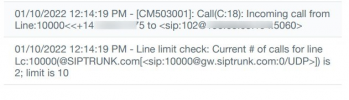
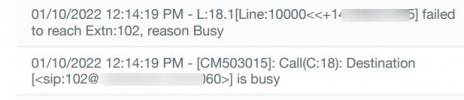
- We created a new USER/EXT and added new Yealink phone and did this quick test and captured log output. see attached. To restate the issue: The inbound caller hears the call go strait to vmail (for any extension we test). The receiving end hears the device ring and can pickup but hears nothing.
 

Attachments

01/10/2022 12:14:19 PM - L:18.1[Line:10000<<+1415XXXXXXX] failed
to reach Extn:102, reason Busy
01/10/2022 12:14:19 PM - [CM503015]: Call(C:18): Destination
[<sip:[email protected]:5060>] is busy

So...for some reason, 3CX sees the extension as being busy.
 
  • Like
Reactions: kennedytechgroup
01/10/2022 12:14:19 PM - L:18.1[Line:10000<<+1415XXXXXXX] failed
to reach Extn:102, reason Busy
01/10/2022 12:14:19 PM - [CM503015]: Call(C:18): Destination
[<sip:[email protected]:5060>] is busy

So...for some reason, 3CX sees the extension as being busy.
Exactly, we're just discussing here too. We're trying to figure out what could be trigger that. The extensions are not set to busy and it's a new vanilla setup for the most part. Any thoughts on what also might trigger a busy indicator on an otherwise basic cloud configuration?

Thanks for taking a look and for chiming in. I appreciate it.
 
I checked the log a bit and can actually see two calls coming in, both routed to extension 102 which would explain why it comes up as busy:

1st call(C17) comes in:
1641898393776.png

2nd call(c18) comes in 4 seconds later:
1641898437512.png

2nd call (C18) sees 102 as busy:
1641898515021.png


Both C17 and C18 calls are still active later on:
1641898540489.png


To test if this is what's happening , try enabling "allow multiple calls" on the extension to check if it stops going to voicemail. If it does stop, you won't be out of the woods yet because you'll still need to figure out why you got two incoming calls for what should've been one. For that you might have to dig deeper or reach out to the provider.

Hope this helps.
 
  • Like
Reactions: kennedytechgroup
All, this one is resolved. The root issue was related to the SIP gateway. For some reason this trunk was stuck on GW2 (a failover backup) at SipTrunk and it was causing the duplicate call issues. Their great support team helped us resolve quickly moving the trunk onto GW1. We tested again and all extensions ring now and the call is not sent direct to voice mail.

So, there were no issues with 3CX config or the phone/devices. I hope this is helpful for others.

Many thanks to Chris and others who chimed in. I really appreciate it and owe you one!

;)
 
  • Like
Reactions: ChrisC_3CX
Glad to see you managed to get to the bottom of this!:)

I'll be closing this thread for now but do let us know if anything else comes up!
 
Status
Not open for further replies.

Forum statistics

Threads
111,974
Messages
590,081
Members
164,899
Latest member
mazet