- Joined
- Jan 24, 2018
- Messages
- 20
- Reaction score
- 2
I have been struggling with trying to get my 3cx App approved. Eery time it fails, I have found something that I screwed up except this last time. Here is the response from the reviewer.
I can send a message from my personal FB account to the business page and it comes through on the text extension/account in 3cx. I can send back as well. THey seem to be saying that they can't do the same, but of course they can't becuase the app is not live and only gets messages from FB Page admins. And do I need to create a FB Test account (am I even allowed to do that) for them and assign it as admin on my page?
Sorry for the dumb questions. At this point, if a partner is reading this and interested, I would be glad to pay to fix it or get it approved.
Thanks
DaveW
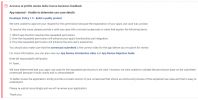
We have determined that your app's use case and screencast for the requested permission are valid. However, we were unable to fully replicate the experience from step #3. Specifically, we are unable to receive the message from the website to the user's end (messenger).
To resolve this issue, please revise your bot to respond and function appropriately, then re-submit for review. Furthermore, kindly provide a Facebook test credentials that can interact with your BOT.
For more information, read our (https://developers.facebook.com/docs/messenger-platform).
Please re-submit accordingly and we will re-review your application.
Thank you.
I can send a message from my personal FB account to the business page and it comes through on the text extension/account in 3cx. I can send back as well. THey seem to be saying that they can't do the same, but of course they can't becuase the app is not live and only gets messages from FB Page admins. And do I need to create a FB Test account (am I even allowed to do that) for them and assign it as admin on my page?
Sorry for the dumb questions. At this point, if a partner is reading this and interested, I would be glad to pay to fix it or get it approved.
Thanks
DaveW
 on what I am doing wrong? Details on failure in this thread