Solved Failed 18 to 20 upgrade

Status
Not open for further replies.

ajsmith227abts

Customer
Joined
Oct 16, 2023
Messages
18
Reaction score
4
Hyper V on Win 2019
Deb 10 V18 fully updated.
2 cores, 4 gigs of ram assigned.

Log attached. Any thoughts?
 

Attachments

Last edited:
Your issue is related with permissions on your custom certificates:

{
"result": "aborted",
"time": "20-06-2024 17:43:36",
"title": "File ownership problem",
"message": "There are files under /var/lib/3cxpbx/Bin/nginx/conf with the wrong user and/or group ownership. Please make sure the files are owner by the user: phonesystem"
}
 
  • Like
Reactions: Evolute IT
Thank you. We handle the SSL cert. Just ssh in and change?
 
It seems that you are using own FQDN and SSL, it seems that someone has modified the file/group ownership, and it should be for phonesystem
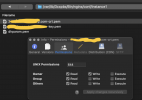
Check your private and public keys rights, and you can use my example below, where all the files have the correct rights for the correct group and user too:

attachment


If it does not work, you will need to reinstall the PBX using the latest ISO.
 
It seems that you are using own FQDN and SSL, it seems that someone has modified the file/group ownership, and it should be for phonesystem
Check your private and public keys rights, and you can use my example below, where all the files have the correct rights for the correct group and user too:

attachment


If it does not work, you will need to reinstall the PBX using the latest ISO.
Thank you! SLL is working great. How can I change them to 'phonesystem' and not corrupt my SSL?
 
Thank you! SLL is working great. How can I change them to 'phonesystem' and not corrupt my SSL?
Run this in your terminal:
Code:
chown phonesystem:phonesystem <nameofthefile>
 
Thank did it. Thank you so much!
 
Status
Not open for further replies.

Forum statistics

Threads
111,974
Messages
590,081
Members
164,899
Latest member
mazet