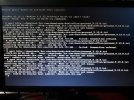
failed to retrieve the preconfiguration file while installation

Status
Not open for further replies.

Mukhtar Memon

New User
Joined
Mar 9, 2021
Messages
6
Reaction score
0
Hello 3cx and members,
I was using 3cx debian in my server at my home for testing. It was working fine but after sometime I changed the location of my server, my FQDN IP was same as it was set in my home. I release FQDN and now FQDN and FQDN IP is in released status in my 3cx subscription.
I want to reinstall the 3cx but I am having issue while installation of 3cx in my server.
see screenshot. how can I resolve this issue?
 

Attachments

  • WhatsApp Image 2021-03-09 at 8.05.14 PM.jpeg
    WhatsApp Image 2021-03-09 at 8.05.14 PM.jpeg
    69.5 KB · Views: 43
Hello ChrisC_3cx,
I am using the latest 3CX ISO file and yes my server have internet connection.
 
I am using the Physical machine and yes I am able to open this link but there is only text:

in netcfg / choose_interface select auto
in netcfg / get_hostname string unassigned-hostname
in netcfg / get_domain string unassigned-domain
in netcfg / wireless_wep string
in hw-detect / load_firmware boolean false
in passwd / make-user boolean false
in clock-setup / utc boolean true
in clock-setup / ntp boolean true
tasksel tasksel / first multiselect none
apt-cdrom-setup apt-setup / cdrom / set-first boolean false
apt-mirror-setup apt-setup / use_mirror boolean false
apt-mirror-setup apt-setup / no_mirror boolean true
in apt-setup / main boolean true
in apt-setup / non-free boolean true
in apt-setup / contrib boolean true
in apt-setup / security-updates boolean false
in mirror / http / hostname string httpredir.debian.org
in mirror / http / directory string / debian
di mirror / country string ""
popularity-contest popularity-contest / participate boolean false
in grub-installer / only_debian boolean true
di grub-installer / with_other_os boolean false
in grub-installer / bootdev string default
in finish-install / reboot_in_progress note
di preseed / late_command string apt-install wget; in-target / usr / bin / wget -O / tmp / post-install http://downloads.3cx.com/downloads/debian9iso/post-install_9.13.0.txt; in-target chmod + x / tmp / post-install; in-target / bin / bash / tmp / post-install
iptables-persistent iptables-persistent / autosave_v6 boolean true
iptables-persistent iptables-persistent / autosave_v4 boolean true
 
Can I open second terminal while installing 3CX?
and will my server get the IP address to access server through putty?
 
As this is an actual physical machine and you have a keyboard connected to it, you can press Alt + Fx (F1 or F2, can't remember which one) that will should give you a second login screen.

It you now the IP already though, sure, you can use putty to connect.

If I remember correctly, at the point when the ISO tries to download the preseed file, it has already installed the OS, so you should have an IP by then.

If not, just continue the installation manually simply with the purpose of getting to the command like to try and troubleshoot why it can't download the file.
 

ChrisC_3CX and NickD_3CX,​

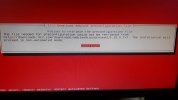
I am getting this error now. My server is also connected with the internet.​


Attachments

  • WhatsApp Image 2021-03-10 at 10.05.16 AM.jpeg
    WhatsApp Image 2021-03-10 at 10.05.16 AM.jpeg
    115.8 KB · Views: 51
I think you should simply format everything and start over again, there seems to clearly be some kind of network issue here, half of the times it is saying that it cannot resolve downloads.3cx.com and this inconsistency worries me.
 

NickD_3CX

how can I format each and everything. I am in environment where there is proxy I am facing this issue because of proxy.
I tried this one
export http_proxy='proxy_server_ip:8080'
but again I am facing "authentication error". I have my username and password for the proxy setting but I can I use it in CLI?
 
Well it would have been nice if you had mentioned this at the beginning....
If the proxy is causing this, then you need to see how it can be fixed.

You said initially this is a physical machine. So, format it, start the installation from the ISO from the beginning, then once you enter the installation wizard of the Debian OS, press Escape and it should take you to the full Debian installation options, where you can configure anything you want. Install as you would any other Debian to get it working.

If all fails, then you need to contact a 3CX Partner to assist you.
 
Status
Not open for further replies.