Fanvil Daylight Saving Time not updating

Status
Not open for further replies.

Chris Walters

Platinum Partner
Advanced Certified
Joined
Apr 6, 2017
Messages
105
Reaction score
43
I have Fanvil phones at multiple locations that have not automatically updated for DST and we're weeks past that date. Re-provision and reboot do not fix the issue. The phones are an hour behind the PBX time, I have confirmed the proper timezone is set on the MC and at the Linux OS level.

This is what the timezone settings look like when I log into the phone:
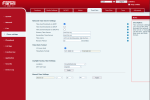
1679608747326.png

If I make the following change, the time updates properly.
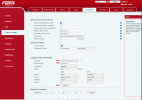
1679608841325.png


Yealink phones that exist in the same LAN as the Fanvil phones updated their time properly and match the PBX time. The Fanvil phones display an hour behind the PBX time. This issue also occurred on X5U-V2, X3SG, and i30 models. On the door phone, that caused the access control settings to not unlock on-time and left my client locked out of their building.

I have found a site with X4U-V2 that seems to have DST set properly. The main difference with this site is that they have a cloud server and an SBC in the LAN. All the sites I have determined the DST isn't set properly has an on-prem PBX. I am still auditing sites to see if more have this same issue.
 
Hi,

According to provided information, Fanvil phones were provisioned to use a "GMT-6:00 United States-Central Time" timezone.
This is a known issue and it was fixed in our latest template.

To get a fixed version of the Fanvil provisioning template please follow the following steps:
1. Update your 3CX Phone System to the latest Update 7 that was published yesterday
2. When it is done, log in to Management Console, navigate to the System->Updates page, and download the new Fanvil provisioning template
3. Reprovision your Fanvil phones.
 
Hello @Aram
I did the procedure above, but still the fanvil phones are 1 hour behind, and like @Chris Walters i have several locations equiped with this type of phone
 
Hello @Aram
I did the procedure above, but still the fanvil phones are 1 hour behind, and like @Chris Walters i have several locations equiped with this type of phone

Hi,

Since we tested this and know that it 100% works, I'm wondering then what is different on your system?

Here's a checklist:

  1. This fix only applies to -6 United States Central Time, which must be set as Global in the MC "Language & Office Hours Settings"
  2. You need to be on Update 7 (Build 312)
  3. You need to be using the default 3CX templates - not custom ones!
  4. The template should have been updated, verify it contains version 138029
  5. The phones all need to be on the latest 3CX Supported firmware
  6. The phones need to be automatically provisioned by 3CX, and have "Use Global Time Zone" in their extension settings
  7. Go in the Webclient Admin now, edit your Office Hours and ensure that the Group is also on Global Timezone. Otherwise it will override the global provisioning.
  8. The phones should be reprovisioned after all the above is done. Confirm they actually reprovisioned, don't just assume the button worked.
 
My local time is GMT +1.
The rest of the checklist is right
 
Sorry then it does not apply to you in this case. This was a very specific fix for -6 United States Central Time.

What is your Country / City? We might have another solution
 
I'm in Swiss Bern
But i just found the solution
In the point seven of your list i put all the groupes in +1 Swiss Bern and seems to work
Now i only have 37 more 3CX instances to go trough
Thas nice
 
Hi,

Unfortunately the Fanvil phones do not have an entry for Switzerland so the system will try to match the closest it can.

I would recommend to change your Global Time on 3CX from the management console and set to +1 Germany Berlin.

If I'm not mistaken the time and DST is common between Switzerland and Germany, so this would always ensure that all phones have the correct time. Let me know if this is helpful.
 
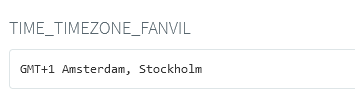
I look up in 3CX paramters and i found this
1679994327174.png
I assumed the phones should take the Amsterdam option but they didn't
This is a lit bit annoying.
I'm a lit bit fed up with this fanvil phones
 
Yes, this is the closest "automatic match" the system made but its not always perfect.

I think if you set Berlin it should solve most problems in the end. Is this an acceptable solution?
 
It seems to work now.
But again Fanvil :confused:
 
Yes, unfortunately. But you know what, I would suggest that as a Fanvil customer you can contact them ask them to add Switzerland Bern in their future firmware. Or alternatively, they can add it in the next 3CX template they send us.

If they include support for it, we will surely publish it to customers.
 
Tank you
That was a fun read indeed
Nice to know that i'm not alone :)
 
Hi,

Since we tested this and know that it 100% works, I'm wondering then what is different on your system?

Here's a checklist:

  1. This fix only applies to -6 United States Central Time, which must be set as Global in the MC "Language & Office Hours Settings"
  2. You need to be on Update 7 (Build 312)
  3. You need to be using the default 3CX templates - not custom ones!
  4. The template should have been updated, verify it contains version 138029
  5. The phones all need to be on the latest 3CX Supported firmware
  6. The phones need to be automatically provisioned by 3CX, and have "Use Global Time Zone" in their extension settings
  7. Go in the Webclient Admin now, edit your Office Hours and ensure that the Group is also on Global Timezone. Otherwise it will override the global provisioning.
  8. The phones should be reprovisioned after all the above is done. Confirm they actually reprovisioned, don't just assume the button worked.
Hi John,

This new template looks to have fixed the issues I was having with the timezones, thanks!

Pretty disappointing that I have to leave the Management Console and go over to the Webclient to make the check on the timezone for the individual groups. Having to use 2 portals to administer all of my systems is BAD. I really hope the timeline for consolidating management functions into one location can be sped up, and then there's a method for registering SOMETHING to all systems the way I could with the 3CX Phone for Windows to provide for better testing.

I know this isn't the place and nothing good will come of me saying this, but it feels like in the last 3 years things have been moving more towards a focus on small partners/systems with the Hosted by 3CX and StartUP options and little has been done in the way of making management of hundreds of systems for Platinum/Titanium partners easier. I feel like 3CX has stated this is the opposite of their goals and they want to focus on things for the big partners, but in practice it's gone the opposite direction.

Best,

Chris
 
Thanks for the feedback Chris and I'm happy to hear that this was resolved.

We are working hard to consolidate the functionality in the webclient admin. With each update you should see further improvements coming, but it will take a bit of time until everything falls in place.

The groups are pretty powerful, they allow you to do some cool stuff for mixed timezones. But as for the phone timezones, if the Group office hours are set to global then your phones should follow the the PBX global rather than the group (provided your entire PBX serves people on the same timezone of course). That should help avoid having to set each group individually, or each device individually. Just something to note as an exception, if your extension belongs to two groups or more then the phone defaults to the MC Global Timezone.
 
Status
Not open for further replies.

Members Online Now

Forum statistics

Threads
111,835
Messages
589,289
Members
164,666
Latest member
infinititravels