Fanvil DST Issues

Status
Not open for further replies.
This issue is back. I have several customers reporting the time being off on their Fanvil's today. I have one in my office that I know of that also has DST issue.

I can manually set DST on the phone, but some of my customers have multiple systems with 100+ extensions. Manually editing every phone is going to be a massive pain.

If I generate a config from the phone and compare it to the default template, the flags for setting DST look wrong. I have a ticket open with 3CX and my support guy doesn't seem to think that's an issue, but here we are.
While not a proper solution, you can try to manually change the timezone via the extension settings of one user to a similar region and then reprovision them. You might find one close (or similar) to the one you need that just happens to work as you want it.

IF that works correctly for you, you could then change the PBX Global Timezone, and then simply hit reprovision on all the phones so they will pull this new timezone info.

This might work well for you, for the time being at least until the manufacturer addresses these issues. I don't know the specifics for your case, but this could serve as a viable solution for some cases.
 
While not a proper solution, you can try to manually change the timezone via the extension settings of one user to a similar region and then reprovision them. You might find one close (or similar) to the one you need that just happens to work as you want it.

IF that works correctly for you, you could then change the PBX Global Timezone, and then simply hit reprovision on all the phones so they will pull this new timezone info.

This might work well for you, for the time being at least until the manufacturer addresses these issues. I don't know the specifics for your case, but this could serve as a viable solution for some cases.
So you're saying there is an issue that needs to be addressed by the manufacturer? Because I'm getting the typical "give me verbose logs" response from support, which is really tough to do during business hours.
 
So you're saying there is an issue that needs to be addressed by the manufacturer? Because I'm getting the typical "give me verbose logs" response from support, which is really tough to do during business hours.
Read the comments from yesterday. Fanvil screwed up.
 
Hi @plwills

Maybe, or maybe not depending on the specifics of the models, the firmware, and the region. The above was just a suggestion in case it happens to be useful for someone managing hundreds of phones, just making that perfectly clear.

If 3CX Support asked for logs then please provide them with whatever they ask for so they can do their part. That should take precedence above all and above the forum too. There could be a number of reasons for the phones showing the wrong time and collecting the facts should always come before speculation and before jumping into conclusions, I cannot stress that enough ;)
 
  • Like
Reactions: CKFIT
Hi @plwills

Maybe, or maybe not depending on the specifics of the models, the firmware, and the region. The above was just a suggestion in case it happens to be useful for someone managing hundreds of phones, just making that perfectly clear.

If 3CX Support asked for logs then please provide them with whatever they ask for so they can do their part. That should take precedence above all and above the forum too. There could be a number of reasons for the phones showing the wrong time and collecting the facts should always come before speculation and before jumping into conclusions, I cannot stress that enough ;)
Thanks. I can now confirm that switching from "use global timezone" to the specific timezone fixes the issue. And on extension where the timezone is specified, switching to global timezone, provisioning, the going back to specific timezone fixes the problem.
 
  • Like
Reactions: ivank and JohnS_3CX
Thanks for confirming, glad to hear this helps! Please inform the Support team too and provide any needed logs so they can follow up too. We appreciate Partners providing us the evidence we need to raise issues with the manufacturers! Especially for things that are hard to catch in the act like DST stuff.
 
Thanks for confirming, glad to hear this helps! Please inform the Support team too and provide any needed logs so they can follow up too. We appreciate Partners providing us the evidence we need to raise issues with the manufacturers! Especially for things that are hard to catch in the act like DST stuff.
Will do. I don't think it's a manufacturer issue though... since the DST option is set correctly when you specify timezone on the provisioning. I think there's something with the way the template provisions the "Use Global Timezone" option.
 
Will do. I don't think it's a manufacturer issue though... since the DST option is set correctly when you specify timezone on the provisioning. I think there's something with the way the template provisions the "Use Global Timezone" option.
Ah that's only part of the story I'm afraid. There's a bit more that happens under the hood and we need more information on this to get a clear picture.
 
This issue is back. I have several customers reporting the time being off on their Fanvil's today. I have one in my office that I know of that also has DST issue.

I can manually set DST on the phone, but some of my customers have multiple systems with 100+ extensions. Manually editing every phone is going to be a massive pain.

If I generate a config from the phone and compare it to the default template, the flags for setting DST look wrong. I have a ticket open with 3CX and my support guy doesn't seem to think that's an issue, but here we are.
Can you please reply to the ticket providing us with the information requested to check? The ticket opened with support mentioning that manual changes were made to the IP phone DST time settings, so these must be factory reset and reprovisioned to use the default time settings for support to be able to check further.
 
Good news, we might be able to fix this issue in time for the upcoming V18 Update 7 final.
 
  • Like
Reactions: CKFIT
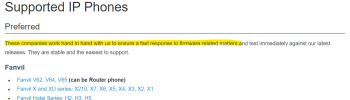
Just looking at the totality of the mentions in this thread, and the issue being batted around since 2021... I don't think having a few customers reaching out to Fanvil is the correct answer here. I think threatening to remove their status as a Preferred phone vendor will carry much more weight.

1679610209734.png

I wouldn't classify a multi-year firmware issue affecting thousands of handsets around the world as a fast response.:rolleyes:
 
Hi,

I want to inform all users that are using the "GMT-6:00 United States-Central Time" timezone and facing a DST problem, that we managed to fix this problem ourselves in our latest template.

To get a fixed version of the Fanvil provisioning template please follow the following steps:
1. Update your 3CX Phone System to the latest Update 7 that was published yesterday
2. When it is done, log in to Management Console, navigate to the System->Updates page, and download the new Fanvil provisioning template
3. Reprovision your Fanvil phones.
 
  • Like
Reactions: CKFIT
Hi,

I want to inform all users that are using the "GMT-6:00 United States-Central Time" timezone and facing a DST problem, that we managed to fix this problem ourselves in our latest template.

To get a fixed version of the Fanvil provisioning template please follow the following steps:
1. Update your 3CX Phone System to the latest Update 7 that was published yesterday
2. When it is done, log in to Management Console, navigate to the System->Updates page, and download the new Fanvil provisioning template
3. Reprovision your Fanvil phones.
Excellent. Thanks for the literal update!
 
Hi,

I want to inform all users that are using the "GMT-6:00 United States-Central Time" timezone and facing a DST problem, that we managed to fix this problem ourselves in our latest template.

To get a fixed version of the Fanvil provisioning template please follow the following steps:
1. Update your 3CX Phone System to the latest Update 7 that was published yesterday
2. When it is done, log in to Management Console, navigate to the System->Updates page, and download the new Fanvil provisioning template
3. Reprovision your Fanvil phones.
Actually, it looks like the updates from the console have been disabled for the time being? We're on update 6 and nothing is listed as available, but I'm assuming it's related to the "other" thing going on with 3CX right now. We'll wait it out and I'm sure we'll be in good shape!
 
Status
Not open for further replies.

Members Online Now

Forum statistics

Threads
111,835
Messages
589,289
Members
164,666
Latest member
infinititravels