Solved Fanvil I31s - No Video, Audio only

Status
Not open for further replies.

Godfrey Armstrong

Silver Partner
Advanced Certified
Joined
May 17, 2021
Messages
10
Reaction score
2
Hi - I have a Fanvil I31s working using STUN for registration, audio is working fine in and out and it is configured for Mag lock opening without issues, however when I a make a call either to or from the door phone I get no video stream, whether I answer with the web app or standalone app. I am on version 18

Questions are
What am I missing in the config to enable the video stream?
Are there limitations when using STUN to enable the video stream?
Do I need to be using an SBC locally for full functionality?
Anyone with experience setting these up using STUN with video streaming?
If you have screenshots of the 3CX and Fanvil configs that work that would be most appreciated

Thanks In advance
 
Hi Godfrey,

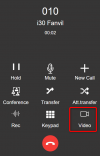
If you press the video button in your 3CX client after the call is established will that allow you to see video?

1647251324635.png
 
Hi John,

I tried that after looking at other forum posts but never got video

Kind Regards

Godfrey
 
Ok this should be doable normally, so I suspect that the traffic is not able to reach its destination possibly due to the fact you are running in STUN.

1. Make sure you are using V18U3, and the firmware stated here: https://www.3cx.com/support/phone-firmwares/

2. Ensure that all the actions have been carried out and then try again.

3. If the above did not bring the desired result, factory reset and reprovision without making any modifications to the device settings via its web UI (to ensure you are using the defaults 3CX generated)


STUN is more difficult to implement due to the fact that there may be parts of the network you cannot control, consider using SBC if you can, this can make the media transport more reliable.
 
Last edited by a moderator:
  • Like
Reactions: Godfrey Armstrong
I will look at the suggestions and report back - Thanks for the replies, much appreciated
 
  • Like
Reactions: JohnS_3CX
No worries, let us know how it went!

Ensure you are testing it using the V18 webclient in Chrome (which is confirmed to work) so that we can minimize the number of variables you will will be dealing with during troubleshooting.
 
Hi John - I now have the Video stream up and running - - the RTP ports hadn't been opened up on the Azure VM - Thanks very much for the assistance - very informative and right on the mark
 
Last edited by a moderator:
  • Like
Reactions: JohnS_3CX
Happy to hear Godfrey, we can mark this one as solved then :)
 
Absolutely John - Tested in Edge and works as well
 
Status
Not open for further replies.

Members Online Now

Forum statistics

Threads
111,835
Messages
589,288
Members
164,665
Latest member
dominik.pepel