Fanvil i64 door phone - dialing issues 3cx v20 20.0.8.1121 hosted

SMT_Laval

Customer
Joined
Apr 17, 2026
Messages
5
Reaction score
2
Fanvil i64 door phone

I can provision it from 3CX without issues, extension sees it online, no issues there.

But dialing either an extension or speed dial is impossible: assign BLFs to two extensions, if I speed dial 1 or 2 it always dials the first speed dial entry.

Tried with BLFs within the extension in 3CX, or manually through the function keys menu in the web UI.

And cannot dial extension directly with phone button. Always fails to dial. Also cannot dial outside number.

The only thing it can dial is the speed dial #1.

Not a lot of info on this i64 door phone... also tried a more recent firmware (2.12.52.10) that the one that is said to be 3CX certified (2.12.48.25). Same result.
 
Are you able to perform internal calls to the device, or do you encounter any issues in that scenario?

When performing a failed test call to a user extension, do you see any related error entries under Admin > Event Log?

As you mentioned, the correct firmware version for the device is 2.12.48.25. Could you please confirm the provisioning method being used? For example, is the device behind an SBC or behind a router phone? Also, is this the only device experiencing issues?

Lastly, are you using the default templates or have they been custom modified?
 
  • Like
Reactions: JohnS_3CX
Internal calls to device : no problem. It auto-answers without issues.
Log: nothing shows up
Tried provisioning behind SBC and direct. Same result
Only i64 on the network, had an i60 and did not have any issues (although it only dialed one extension, i64 has a keypad, thus the upgrade)
Default templates. Phone shows up in PNP Phones when reset, assigning to extension works like any other phone.
 
Hi @SMT_Laval

I can confirm the following for you:

1. Device supports adding BLFs using the Speed Dial type, not BLF type. This is clarified in the guide.
2. If I assign speed dials 1 and 2 to the i64 extension, it dials them just fine when you press these buttons as they appear in position 1 and 2 (regardless of what the icon shows):
1776667849291.png
3. Also, if I dial a number like extension 100 and press the Phone icon, it calls that number and also offers video.
4. Finally, if we call the door phone extension, it will auto-answer the call.

This is with the certified firmware on V20 Update 8, behind SBC on a cloud hosted PBX, or direct on a Local PBX.
Hope this helps clarify any questions you had, and helps you with your troubleshooting.


And some feedback if you dont mind:
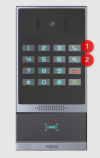
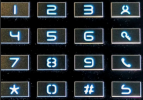
a) Interestingly my i64 has a different button layout than the one is the Fanvil stock photos.
Would you mind testing yours ignoring your layout, and using it as if it was like my layout below?
And if it works, let me know if your layout is the same as the stock photo above, or like my photo below.
1776669856420.png

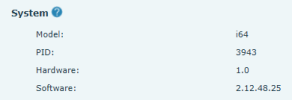
b) My HW is V1.0, what is yours saying?
1776669627376.png

If I can verify the above with you, we can raise the issue with the manufacturer.
 
  • Like
Reactions: BrunoI_3CX
Hi JohnS,

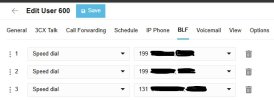
1- Added BLFs using speed dial type:

3cx-1.jpg

If I dial 1 then phone button, it dials the first speed dial (ext.199). If I dial 2 then phone button, it also dials the first speed dial. if I dial 3 then phone button, it also dials the first speed dial...

If I dial extension 200 by typing 200 then phone button, it dials the first speed dial. If I dial extension 117 then the phone button, it also dials the first speed dial...


2- My buttons are the same as on your pic. I use your layout for dialing

3- If I dial the Fanvil extension 600, it auto-answers the call

4- My hardware is a bit newer than yours :

pro-Sulhui5L.jpeg

Weird...

Patrick
 
Oh my God... just realized that the speed dials were the two button marked 1 and 2 only, and not 1+phone or 2+phone... explains why I'm always dialing the first speed dial whatever I do ! But only two speed dials is not enough, so I'd rather have people dial the extension.

So, there are only two possible speed dials on this... got it. But how do I dial an extension ? Removed the speed dials, and trying to dial an extension with only three digits (and nothing else)... or three digits with + green person button, or three digits plus phone button... Can't seem to find the right combination...

Patrick
 
OK so then it seems to work correctly as per your last reply. To recap:

1. Press the speed dial button only, and it will call the destination.

2. Dial a number + phone icon and it will call that number.

This much I can also verify on mine.
 
So yes, no.1 works. But only two speed dials is not enough.
No.2 though doesn't work, Dialing an extension is not working. That'S what I need to figure our. Or maybe I'll speed dial to a digital receptionist, then offer choices from one to nine for the person wanting to call. So then I wouldn't need extension dialing. And maybe eventually there will be a fix
 
Assuming the device can receive calls, it should also be able to make them but I do not have V1.1 here to confirm for you.

I think you might need to speak with Fanvil on this one.
 

Members Online Now

No members online now.

Forum statistics

Threads
111,834
Messages
589,287
Members
164,663
Latest member
svdDGS