Solved Fanvil PA2 not authenticating

Status
Not open for further replies.

chance-wmt

Bronze Partner
Advanced Certified
Joined
Nov 23, 2020
Messages
96
Reaction score
30
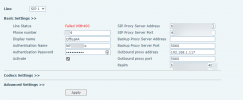
Having an issue with a Fanvil PA2, it provisioned via an SBC but will not authenticate Error 400.
Factory reset
Firmware update
even tried manually setting it up too and will not authenticate. Any ideas?
1635975676311.png
 
I'm assuming you've seen this guide?

https://www.3cx.com/sip-phones/fanvil-sip-doorphones/

You shouldn't have to but I'd try changing the Authentication ID in 3CX to something simple (like the extension number) and then re-provisioning or if still manually provisioning changing it in the PA2 to match. You shouldn't need to do that for a supported device but many older devices didn't work with alphanumeric auth IDs
 
  • Like
Reactions: chance-wmt
Hello,

I have provisioned one on firmware 2.8.2.7020, with V18 in SBC mode.

In my case I did not get that error. Please confirm what firmware version you are running, exact PBX and SBC versions too.
 
  • Like
Reactions: chance-wmt
Interesting, an update for the PA2 configuration just came out. Let me see if that works. I'll update the forums on my findings.
 
Hello,

I have provisioned one on firmware 2.8.2.7020, with V18 in SBC mode.

In my case I did not get that error. Please confirm what firmware version you are running, exact PBX and SBC versions too.
Well I feel like an idiot, I installed Fanvils latest firmware instead of 3CX latest firmware. I downloaded 3CX firmware and works just fine of course... Thanks for pointing me in the right direction!

Anyway, I need to slow down sometimes lol.
 
  • Like
Reactions: JohnS_3CX
Glad to hear it was sorted!
 
  • Like
Reactions: chance-wmt
Status
Not open for further replies.

Members Online Now

Forum statistics

Threads
111,832
Messages
589,284
Members
164,662
Latest member
DejanMDS