

- Joined
- Nov 19, 2009
- Messages
- 19
- Reaction score
- 4



Thanks! Love the auto update option tooHi all,
V66 and V66Pro are now supported router phones.
1. Upgrade to V20 Update 9
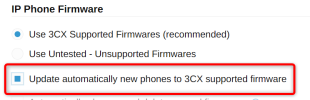
2. Ensure the phones have the correct firmware from here before you provision them or enable this option before adding them, Under Phones > Options
View attachment 51849
Enjoy!


The V66 Pro has 116 DSS keys. If you try to add a BLF on slot 117, for example, it doesn't show on the EM60?Good morning everyone, we installed a V66 Pro for our receptionist (how cool is that cordless handset!!!) and the phone provisioned correctly. However, I can't get the BLFs on the EM60 expansion directly from 3CX! I remember that with Yealink you had to keep adding BLFs in addition to those supported by the phone. How does it work with Fanvil? I tried adding BLFs up to position 200, but 3CX won't assign the BLFs on the expansion!
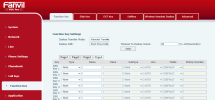
Yeh it looks like a template issue, the attached should get them workingYes, as written in the previous message, I got to the last position (200), but nothing appears on the expansion. The BLFs from 1 to 11 go in the Side Key (basically the phone's home screen), those from position 12 to position 127 (11+116) end up in the 4 pages of the Function Key (basically, if I press on the display to see more than 11 BLFs, the screen changes and I can browse 4 pages of keys), while if I insert positions 128 to 200, they don't appear anywhere. I would expect them on the 3 pages of the EM60 expansion, but unfortunately nothing. Could it be a template issue that isn't completely OK yet?
View attachment 51876

I have the same problem with the V65 + EM60 combo. I tried to use the template but I think you only made the changes for V66 and not V65?Yeh it looks like a template issue, the attached should get them working
Hi there. Just came across this post looking for a solution. It appears as if we are still without a template for the V65 + EM60 combo. I've tested (basic tested) the one attached here and it seems to be working for us. We've designated the EM60's function keys as 31 through 90 (31 to 50 for page 1, 51 to 70 for page 2, 71 to 90 for page 3). Give it a try if anyone needs it.I have the same problem with the V65 + EM60 combo. I tried to use the template but I think you only made the changes for V66 and not V65?
Founded in 2005, when VoIP was an emerging technology, 3CX has gone on to establish itself as a global leader in business communications.


