Fanvil X series (Router phones) | Configuration Guide

KaterinaK_3CX

Joined
Feb 24, 2016
Messages
246
Reaction score
36
Supported models:
  • Fanvil X1S/ X1SP/ X1SG
  • Fanvil X2C/ X2P
  • Fanvil X3/ X3S/ X3G/ X3SG / X3SP / X3SP V2/ X3U PRO
  • Fanvil X4/ X4G/ X4U / X4U-V2
  • Fanvil X5/ X5S/ X5U / X5U-V2
  • Fanvil X6 (Hardware version 1.2 and higher) / X6U / X6U-V2
  • Fanvil X7/ X7C / X7A / X7V2 / X7C-V2
  • Fanvil X210V2 / X210i-V2
Router phones:
Read the guide.
 
Last edited:
Do we setup the router phones in the management console of 3cx or in the phone itself?
 
Do we setup the router phones in the management console of 3cx or in the phone itself?
Nope - this is done via the new Webclient Admin. Give your extension admin rights, and do it from there:
1670836182291.png


It cannot be done via the management console or from the phone itself.
 
  • Like
Reactions: Evolute IT
John, so if I have a potential client that will need 6 fanvil x5u phones. Can I purchase 1 x5u-v2 and set that one up as an sbc and not need a raspberry PI as an sbc, and then the other 5 phones can be x5u version 1?
 
Also, when will update 6 be official for the pbx?
 
John, so if I have a potential client that will need 6 fanvil x5u phones. Can I purchase 1 x5u-v2 and set that one up as an sbc and not need a raspberry PI as an sbc, and then the other 5 phones can be x5u version 1?
Yes that is correct:

- You will assign the X5U-V2 as a "Router phone" and provision it (as per our guide).
- You can then add the other 5 phones as "Normal phones", point them to that new SBC and then reprovision them

They will use the X5U-V2 as their SBC, and no Pi will be needed.

Update 6 is coming soon! Keep an eye out on our blog posts
 
Yes that is correct:

- You will assign the X5U-V2 as a "Router phone" and provision it (as per our guide).
- You can then add the other 5 phones as "Normal phones", point them to that new SBC and then reprovision them

They will use the X5U-V2 as their SBC, and no Pi will be needed.

Update 6 is coming soon! Keep an eye out on our blog posts
And the router phone option if available in the web client only? I won't be adding phones in the main mgt console?
 
Yes that is correct - this new feature is done via the new Web Client Admin panel in Update 6.
 
And no more defining an sbc in the main mgt console?
 
And no more defining an sbc in the main mgt console?
You can add normal SBCs in the management console like before if you want (for Windows / Debian PC or Pi).

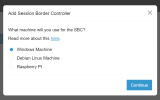
You can also add normal SBCs via the Webclient Admin if you want:
1670863228756.png

But the only exception is the Router phone: this must be added from the webclient, because it also creates a special SBC entry for that router phone.You cannot create this special entry otherwise.
 
Can version 18 update 6 (build 880) do the phone routing?
 
Hi can we get an update to the official fanvil template for x3u Pro phones.
It looks like they changed the naming convention from 2.4.7.5 to 2.4.8

The old phone was known by X3U_Pro and the template is applied and works correctly
once the firmware updates the phones name Changes to X3UPro and it does not have a match so it applies the generic x3 template if I downgrade the firmware it is found correctly and the background is applied.
The 2.4.8 is current and supported on 3cx so the template has to be updated.
 

Attachments

  • x3u.JPG
    x3u.JPG
    14 KB · Views: 13
Hi,

Please note that 2.4.8 is not supported on 3CX.

This problem is caused by using incompatible firmware and the only way to solve it is to use the 3CX certified version that we provide: https://www.3cx.com/support/phone-firmwares/
That's what I thought but the console shows the firmware is up to date and the phone is not red. From what I understand it should be red or have a message that its unsupported. I incorrectly assumed the website was lagging behind the new 3cx release. So for a good learning lesson can I say that the firmware listed on the website is the standard to go by. Not the status in the web panel? or do unsupported phones not show red anymore?
 

Attachments

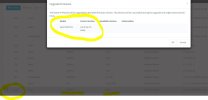
  • x4u 3cx.JPG
    x4u 3cx.JPG
    59.4 KB · Views: 13
From what I understand it should be red or have a message that its unsupported
Correct, but only if we are talking about a model that 3CX is aware of. Since this firmware has a user agent that matches with practically nothing the system knows, no messages are shown (one of the downsides of using unsupported firmware I guess).

This is one of those rare cases where the manufacturer independently released a firmware version with different user agents so it's understandable that it would cause confusion. Not much we can do about it from our end since this is not the version we offer via our platform, so yeah best check our website which is always updated.

It might also be a typo, funny story I've come across that in the past where a brand name was misspelled and the agent would not match xD Needless to say, we did not release that version to the public
 
Supported models:
  • Fanvil X1S/ X1SP/ X1SG
  • Fanvil X2C/ X2P
  • Fanvil X3/ X3S/ X3G/ X3SG / X3SP / X3SP V2/ X3U PRO
  • Fanvil X4/ X4G/ X4U / X4U-V2
  • Fanvil X5/ X5S/ X5U / X5U-V2
  • Fanvil X6 (Hardware version 1.2 and higher) / X6U / X6U-V2
  • Fanvil X7/ X7C / X7A / X7V2 / X7C-V2
  • Fanvil X210V2 / X210i-V2
Router phones:
Read the guide.
Hello I got a Fanvil X4U that I am trying to setup as a router phone, tried to update the firmware with the above one and did not go thru, don't work, on the console the phone is listed but it has a red dot next to it and no ip address.
What should is do?
 
@Onepl as the guide says, only the Fanvil X4U-V2 can be a router phone.

The regular X4U (the Version 1 hardware basically) cannot.

You can confirm this by looking at the back on the sticker, there should be Rev. A for the V1 hardware or Rev B. for the V2 hardware.
 
  • Like
Reactions: JohnS_3CX
Thank you
 
  • Like
Reactions: jed

Forum statistics

Threads
112,155
Messages
591,011
Members
165,185
Latest member
autoloanpr