Fanvil X3S as Hot Desking

Status
Not open for further replies.

LyonAdmiral

SMB User
Basic Certified
Joined
Aug 10, 2015
Messages
79
Reaction score
3
I've added the phone MAC address into hot desking verified the model and MAC are correct rebooted the phone and assuming I need to do something on the phone;

Is this the section and what should I populate with?
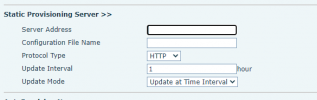
1642174110455.png
 
Hi,

If you go to the Phones tab of your 3CX system, you should see the phone appearing in that list.

You select phone, and then press the "Ass. Ext." button and the system will automatically configure it for you.
 
I've followed the instructions on the hot desking page, I've watched the youtube training videos that Nick has done, great job by the way Nick. The phone is listed on the hot desking page but when I boot up the phone it doesn't provision as a hot desking phone.
 
It will not provision just by booting up. You have to do it like I explained above to send the command to configure:

If you go to the Phones tab of your 3CX system, you should see the phone appearing in that list.

You select phone, and then press the "Ass. Ext." button and the system will automatically configure it for you
 
It will not provision just by booting up. You have to do it like I explained above to send the command to configure:
My SBC is green and connected to 3CX; my phone is plugged in (recently reset it) at the same location as the SBC, doesn't show up in my phones list.... hold that thought.
 
If the phones do not show up in the phones list then clearly something is wrong. You need to check the following:

a) Ensure the phone has the latest firmware from here

b) Check your network: the SBC has to be on the same network and same switch and same IP range as the phones. If the SBC or phones are behind a secondary device (ie. other router, managed switch etc) then it may be blocking the multicast messages that the phones send out for the SBC to see. This is sufficient to prevent reset phones from appearing. You can learn more here

c) Where is the SBC installed? If on a Windows machine, disable the firewall entirely and then restart the machine. Then reset the phone again and see if it appears now.

d) Does the SBC machine show more than one network adapter? Disable/uninstall all the adapters other than the main one, and restart the machine. Then reset a phone and check again.

e) Does the SBC machine have other software installed and/or is it also used for other reasons? You should have a dedicated SBC with nothing else installed other than the OS + SBC software. This can be done by using a Raspberry Pi, or you can run a VM on an existing machine using our Debian ISO. Let me know if you need more info on this
 
Status
Not open for further replies.

Members Online Now

Forum statistics

Threads
111,835
Messages
589,288
Members
164,665
Latest member
dominik.pepel