- Joined
- Aug 10, 2015
- Messages
- 79
- Reaction score
- 3
If you go to the Phones tab of your 3CX system, you should see the phone appearing in that list.
You select phone, and then press the "Ass. Ext." button and the system will automatically configure it for you
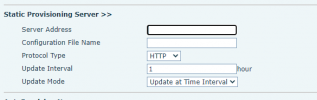
My SBC is green and connected to 3CX; my phone is plugged in (recently reset it) at the same location as the SBC, doesn't show up in my phones list.... hold that thought.It will not provision just by booting up. You have to do it like I explained above to send the command to configure:
Founded in 2005, when VoIP was an emerging technology, 3CX has gone on to establish itself as a global leader in business communications.