Solved Fanvil x5(s)(u) will not update time from NTP

Status
Not open for further replies.

VIQ

Silver Partner
Joined
Mar 30, 2010
Messages
8
Reaction score
4
We have encountered an issue where phones, in and out of network, are not pulling time from the NTP parameter correctly.
We have tried multiple NTP servers; time1.google.com, pool.ntp.org, time.windows.com, and using their associated IPs.

System Info:
Version 18.0, Update 7, Build 312
All templates current
GTZ: GMT-5 US Eastern Time

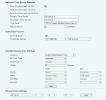
Here is a visual example. The time is current 1:18 PM EST 4/4/2023 and the phones time is wildly off.

1680628726362.png
 
Hi VIQ,

- 3CX Version?
- Phone firmware version?
- Using default 3CX templates or Custom?
- Are you blocking port 123 (for NTP) on your firewall?
- Why did you change the default pool.ntp.org in the first place?
 
Most of what you are asking was answered above. I will reiterate and expand where I can to answer the other questions.

Version 18.0, Update 7, Build 312
Firmware version: 2.4.12
All templates current, not using any custom templates for the Fanvils
123 appears to be closed
Troubleshooting reasons

If 123 being closed is the issue I can discuss with the company that controls their router to open this port and forward it to the 3CX server. I can then change the NTP server to the 3CX.
 
Hi,

If the NTP port is closed that would be enough to explain it. A capture on the phones can also prove it if you wish to confirm.

You cannot use 3CX as your NTP, rather both the phones and the 3CX machine need to synchronize to a common NTP so they both have the same time.

Time sync/drift issues can cause trouble in SIP and TLS, and logs to name a few..
 
Thanks for the information. I will reach out to the client to see if we can get this port opened for their phone network so that we can verify.
 
We have confirmed that port 123 out is open for outgoing traffic.
 
Ok then at this point I would advise to try and mirror capture a LAN port on your switch, and then power up one phone connected to that port.

In the capture you will see some useful information from the start up procedure like:

- does the phone send a DNS query for pool.ntp.org?
- does it get a reply?
- if it gets a reply, does it contain a valid IP?
- does the phone contact that IP?
- if it contacts the IP, does it get a valid NTP response?

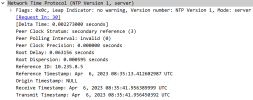
Here is a healthy example of traffic
1680770348832.png

..and the contents of the reply from the NTP server
1680770469329.png

I'm by no means an NTP expert but if the above conversation does not take place, I'm fairly certain your phone will not pick up the correct time :)

If you succeed, the hour may appear wrong (due to localization settings), but the date at least should be correct.
 
Thanks for the reply. I was able to use this above method to supply additional information to the client network company. They were able to resolve the time issue with this information.
 
  • Like
Reactions: JohnS_3CX
Great news! Glad to hear it was resolved
 
Status
Not open for further replies.

Members Online Now

Forum statistics

Threads
111,834
Messages
589,287
Members
164,664
Latest member
dominik.pepel