Fax Server problems

Status
Not open for further replies.

ecg_admin

Customer
Basic Certified
Joined
Apr 22, 2022
Messages
15
Reaction score
0
Hello we rencetly change from hosted on 3CX to self manage to a client server, everything is work but we notice the fax is answer but no sent to the email address, can any one give us any advise .
 
Check your SMTP settings and check SMTP logs on your server.
 
Check your SMTP settings and check SMTP logs on your server.
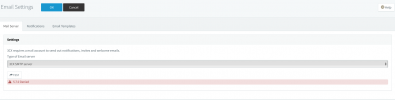
  • 5.7.0 Denied I get this, this server was first hosted on 3cx but now is on the client server... you thinks this can be the problem?
 
  • 5.7.0 Denied I get this, this server was first hosted on 3cx but now is on the client server... you thinks this can be the problem?
Set the SMTP server to 3CX and see if you receive an email.
 
Yes, denied access is the issue. You need to work out why the destination smtp server is not accepting the connection from the 3cx server

What are your smtp settings ? - 3cx smtp server , custom smtp or office365
 
Yes, denied access is the issue. You need to work out why the destination smtp server is not accepting the connection from the 3cx server

What are your smtp settings ? - 3cx smtp server , custom smtp or office365
3CX SMTP
 
IS NOT ALLOW ME CHANGE THISScreen Shot 2022-04-22 at 11.51.10 AM.png
 
Last edited:
Can you access the 3CX Management console externally using your 3cx fqdn

The issues is a mismatch on the 3cx server fqdn and 3cx server wan IP address.

Under Settings - Network Settings , make sure the static IP address matches your wan IP address if you have a static IP address

If you have dynamic wan IP address, make sure 'Dynamic Public IP' is ticked
 
Can you access the 3CX Management console externally using your 3cx fqdn

The issues is a mismatch on the 3cx server fqdn and 3cx server wan IP address.

Under Settings - Network Settings , make sure the static IP address matches your wan IP address if you have a static IP address

If you have dynamic wan IP address, make sure 'Dynamic Public IP' is ticked
is match
 
Are you allowing tcp port 2528 out from your network, this is the port used by 3cx smtp - not blocking port 2528 outbound
 
Are you allowing tcp port 2528 out from your network, this is the port used by 3cx smtp - not blocking port 2528 outbound
Yes
 
Can you access the 3CX Management console externally using your 3cx fqdn

The issues is a mismatch on the 3cx server fqdn and 3cx server wan IP address.

Under Settings - Network Settings , make sure the static IP address matches your wan IP address if you have a static IP address

If you have dynamic wan IP address, make sure 'Dynamic Public IP' is ticked
YES we can access the console from outside using FQDN, the IP is match, and my UDMpro have all the port open for 3CX all other services are working perfect.
 
Refresh your license, under setting , license - click on refresh license
 
Status
Not open for further replies.

Forum statistics

Threads
111,974
Messages
590,083
Members
164,900
Latest member
Silent_Guru