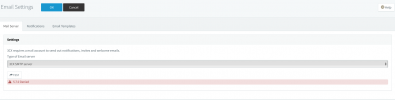
Check your SMTP settings and check SMTP logs on your server.
Set the SMTP server to 3CX and see if you receive an email.
- 5.7.0 Denied I get this, this server was first hosted on 3cx but now is on the client server... you thinks this can be the problem?
3CX SMTPYes, denied access is the issue. You need to work out why the destination smtp server is not accepting the connection from the 3cx server
What are your smtp settings ? - 3cx smtp server , custom smtp or office365
IS NOT ALLOW ME CHANGE THIS
IS ON 3CX SMTPSet the SMTP server to 3CX and see if you receive an email.
what can I do to fix the smtp error?This is correct if you have standard license
is matchCan you access the 3CX Management console externally using your 3cx fqdn
The issues is a mismatch on the 3cx server fqdn and 3cx server wan IP address.
Under Settings - Network Settings , make sure the static IP address matches your wan IP address if you have a static IP address
If you have dynamic wan IP address, make sure 'Dynamic Public IP' is ticked
YesAre you allowing tcp port 2528 out from your network, this is the port used by 3cx smtp - not blocking port 2528 outbound
YES we can access the console from outside using FQDN, the IP is match, and my UDMpro have all the port open for 3CX all other services are working perfect.Can you access the 3CX Management console externally using your 3cx fqdn
The issues is a mismatch on the 3cx server fqdn and 3cx server wan IP address.
Under Settings - Network Settings , make sure the static IP address matches your wan IP address if you have a static IP address
If you have dynamic wan IP address, make sure 'Dynamic Public IP' is ticked
Still the sameRefresh your license, under setting , license - click on refresh license
Founded in 2005, when VoIP was an emerging technology, 3CX has gone on to establish itself as a global leader in business communications.