Firewall & Router Configuration

Status
Not open for further replies.

KaterinaK_3CX

Joined
Feb 24, 2016
Messages
246
Reaction score
36
To use remote extensions or a VoIP Provider, you need to make changes to your firewall configuration, for 3CX to communicate successfully with your SIP trunks and remote IP phones. This guide gives you a general overview of the ports that need to be opened/statically forwarded on your firewall.

Read the Guide.
 
Last edited:
I'm not sure exactly where to post this. I'm a new user. I set up 3CX on Google Cloud using PB Express. I purchased supported phones by Grandstream (GXP2170) but can't seem to provision them. I think my confusion lies with port forwarding. It seems that I would need to open ports on my local lan so that my c3x install can see my local lan. If the website is any indication, this is a common install, but I can't find a single video or doc explaining this set up in a satisfactory way. This has been anything but easy. :-(
 
In STUN (Direct SIP), you need to assign a reserved IP to the phone and forward the ports in 3CX Phone Provisioning tab to the phone (by default: SIP is UDP 5065, RTP is UDP 14001-14019). This depends on your firewall a lot. What's the brand/model?
 
That was a quick response. I have a Ubiquiti network with a USG firewall.

I actually set up an SBC on a desktop we had in the office. I was able to find all of the phones. So I'm stumbling through it. We are able to call within the shop but we are missing audio. I'm going to work on the port forwarding now.

Thanks for the speedy response. Honestly I wasn't expecting a reply that fast.

Greg
 
That was a quick response. I have a Ubiquiti network with a USG firewall.

I actually set up an SBC on a desktop we had in the office. I was able to find all of the phones. So I'm stumbling through it. We are able to call within the shop but we are missing audio. I'm going to work on the port forwarding now.

Thanks for the speedy response. Honestly I wasn't expecting a reply that fast.

Greg
If you're using an SBC, then port forwarding is not needed. Assign a static IP to the SBC machine then choose 3CX SBC as provisioning method, enter the SBC IP, save and reboot the phones. They will use the SBC and this will fix all your issues. Much simpler this way.

If you really want STUN (more than 3 phones? forget it, use the SBC), then assign different SIP and RTP ports to each phone and forward those. Also, you need to enable PBX Delivers Audio on the STUN extensions to allow audio to work both ways when calling from extension to extension (it's a known issue of STUN that almost always occur).
 
Well this is silly. On the back of our phones, Grandstream 2170 there are two handset jacks. I switched the phone cord from one to the other and now the handset works. Weird no mention of the fact that one of the jacks is dead in the manual. But I can confirm that the right jack is live the other is not.

Thanks again for your help!!

Greg
 
Well this is silly. On the back of our phones, Grandstream 2170 there are two handset jacks. I switched the phone cord from one to the other and now the handset works. Weird no mention of the fact that one of the jacks is dead in the manual. But I can confirm that the right jack is live the other is not.

Thanks again for your help!!

Greg
My friend, one is for the handset (the one you hold in your hand) and the other one is for hEADset (for RJ9 headsets). Look at the icon ;)
 
Laughing at myself. That made my day!! Thanks for sharing. It's all working great now.

Greg
 
  • Like
Reactions: Evolute IT
I'm not sure exactly where to post this. I'm a new user. I set up 3CX on a raspberry pi with a static IP address.

I have provisioned one ip phone Fanvil x5s with several apps on other mobile phones and laptops, all working locally on my LAN.

Next step to call the outside world? (BT Smart hub 2 router set up (UK)) would like to be able to call other outside phones from my one IP phone?

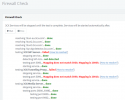
Run firewall test:

Disabled Norton’s firewall, set up port forwarding (ports 5060-udp then TCP, (ports 5090-udp then TCP) and range 9000..10999 not using DMZ? Or SIP ALG

I think my confusion lies with port forwarding: the result below? please help thank you!
1611336927368.png
Read the guide confused?
 
Hi @ivanO,

From what it seems your firewall is not doing port preservation on ports 5060 and 5090. You will need to ensure that the firewall does not do source port remapping.

The "How to resolve?" link will tell you what the firewall checker checks and what you will need to do on your firewall to resolve this.

https://www.3cx.com/docs/firewall-checker/

In addition to your firewall, check if you have an ISP Router/CPE in front of the firewall which may also have settings which need to be configured.
 
@katerinaK @NicholasP_3CX Is there a way to get a Guide for Sophos SG UTM? I think it is also a very popular firewall, isn't it? We are also using Sophos RED Devices with this Firewall. This is a VPN Device for other company locations. Maybe you could also tell what is necessary for those, to have desk phones, soft-/webclient and webmeeting working here.
 
@PhilK some of our firewall guides are submitted by partners and we have them published on our website. If you have access to a firewall you could create a guide and submit it for approval!

We do not have access to every brand of firewall out there, as we do not maintain an active relationship with each one of the manufacturers.

But we do have clear guidelines in the 3CX guides as to what is required.

Port forwarding
Access Control Lists
Port Preservation
SIP ALG Disabled
 
  • Like
Reactions: PhilK
Is there IP address rule list so that 3CX doesn't block that IP address if a user use the incorrect userid and password? I want 3CX never block that IP.

The reason I ask is because 1 of my admin users used the incorrect password to many times when he was at the office. This then block all the people from the office to access 3CX.

Kind Regards
Leo
 
Hi Leo,

You can whitelist the IP by setting it to Allow instead of Deny , im not sure if 3CX overrides this incase someone uses invalid credentials multiple times.
 
Hi Leo,

You can whitelist the IP by setting it to Allow instead of Deny , im not sure if 3CX overrides this incase someone uses invalid credentials multiple times.
I think it does because you are surly authenticating again 3CX service. Just not sure how to configure 3CX service to not instruct a 900 sec block
 
The Allow overrides failed logins. The list/page is not available on 3CX hosted servers though.
 
  • Like
Reactions: JosIPVG
Status
Not open for further replies.

Forum statistics

Threads
112,291
Messages
591,733
Members
165,416
Latest member
Graham Robertson