- Joined
- Jul 24, 2019
- Messages
- 108
- Reaction score
- 22
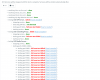
I have a fresh V16 install up and running and my firewall test results are attached.
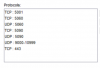
I've got all of the required ports open in my Watchguard (see attached). I've got 3 extensions registered for testing and internal and external calls work fine with audio both ways. I can access the web GUI as well so it appears that my port forwards are working..
However if I direct my test DID to a digital receptionist, I see the call establish but I have no audio when the recording is playing.
What's weird is I have another 3CX install behind the same firewall that works just fine -- the only difference is the public IP addresses of them are on two different IP blocks.
Anyone have any idea of what I should be looking for?
I've got all of the required ports open in my Watchguard (see attached). I've got 3 extensions registered for testing and internal and external calls work fine with audio both ways. I can access the web GUI as well so it appears that my port forwards are working..
However if I direct my test DID to a digital receptionist, I see the call establish but I have no audio when the recording is playing.
What's weird is I have another 3CX install behind the same firewall that works just fine -- the only difference is the public IP addresses of them are on two different IP blocks.
Anyone have any idea of what I should be looking for?