Flowroute in v20 - missing 'Put Public IP in SIP VIA Header'

kmcmichael

Premier Customer
Joined
Jan 4, 2021
Messages
36
Reaction score
3
Found an issue where the local IP was set in the IP Header - went to change this in the trunk settings and no longer see that option to select in v20.

This was upgraded from a v18 to v20 - flowroute was on v18. The option was there before but it's not present in v20.

Has it been moved elsewhere? I was not able to find it.

thanks
 
This is not about caller ID - it's about the IP address that's in the header

Via: SIP/2.0/UDP 172..x.x.x:5060 needs to be Via: SIP/2.0/UDP publicip:5060
The setting to do it isn't there anymore
1729686815773.png
 
Please check that you are using the default template for Flowroute, it should work out of the box with the provided template, here is the guide for that voip provider.

If you wish to make an extra change in the sip trunk then export it, edit the file in notepad++ and then from the advanced menu --- templates --- voip provider templates import the file.

Have a good day!
 
Yes, I am using the default template - it's simply missing the settings in v20. The flowroute template i v18 does have those. Looking at the templates - I see that generic sip provider has the settings so I'm just going to use that as eventually I would assume this will be fixed.
 
I am also using the default Flowroute template and encountering this same issue. Is there any fix for this issue, short of using the generic template to try and work around it?
 
  • Like
Reactions: Saky
I was aware of the Flowroute issues, and we were impacted by them. However, Flowroute support also indicated the reason they could not re-route our traffic successfully was that:

"you are sending Private IPs in the the Contact and Via headers. This further limits the number of additional peering networks that routing can be attempted through as not all carriers will support NAT PUB flags. Please address the NAT issues with your configurations and retest the traffic"

I have run the 3CX firewall checker and all appears good/correct. So, I believe the only way to address this with the out of the box Flowroute template, is to export the template, make the change and then reimport it. As the setting that was exposed in v18 is no longer in the UI under v20.
Thoughts?
 
We are currently speaking with Flowroute and looking into ways we can resolve this. Just a note though, this is not a NAT issue or misconfiguration. This is the way the Flowroute template has been working for years.
We will update you once we have a solution.

So, I believe the only way to address this with the out of the box Flowroute template, is to export the template, make the change and then reimport it. As the setting that was exposed in v18 is no longer in the UI under v20.
This will not work. You need to wait for a solution from Flowroute or us.
 
Thanks.

What Flowroute is advising, currently--
"You may be able to address this in the 3CX v20 deployment when logged into 3Cx by:
  1. Login to the 3CX GUI
  2. Navigate to the Admin Console
  3. Go to Voice&Chat
  4. Select Trunk
  5. Options tab
  6. Check "Put Public IP in SIP Via header"
  7. You should now be able to enter your Public IP
  8. Save Configurations and allow a few minutes for those changes to propagate through the platform
  9. Retest traffic"
Of course, that flag does not exist in the UI for 20.0.5.551, which we are currently running.
 
We are currently speaking with Flowroute and looking into ways we can resolve this. Just a note though, this is not a NAT issue or misconfiguration. This is the way the Flowroute template has been working for years.
We will update you once we have a solution.


This will not work. You need to wait for a solution from Flowroute or us.
just checking in - have we made any progress with Flowroute. Their Tier 2 support is basically saying "not our problem". They are claiming the implementation of STIR/SHAKEN here in the US is the underlying issue. Their advice is is get support from y'all.
 
if anyone is looking for a solution - got this from flowroute support just a short while ago... we're about to test it.

Additionally, we’ve attached an updated 3CX Flowroute template .PV file that resolves the VIA header issue. You do not need to recreate the trunk from scratch or make extensive changes, simply replace the existing file at the OS level. Then, copy and paste the public IP address of your 3CX instance into the “Public IP in SIP Via Header” field under the “Options” tab of the Flowroute SIP trunk. Save and retest to confirm.
 
have confirmed this seems to resolve the issue. Doing a PCAP I can clearly see the public IP in the header now - instead of the LAN address. And we were able to make calls that we couldn't previously.
 
We are logging this same issue across multiple 3CX installations as of July 1st. Flowroute is responding with a SIP 500 Server Error or a 404 Not Found.

The template previously mentioned allows you to change the IP in the VIA header to a public IP; however, that template should NOT be deployed on production installations as a general 'fix'. The template will be overwritten when 3CX is updated and depending on user permissions, you could cause the file to be locked so that the trunk does not work at all.

If you are having issues this morning, you can contact Flowroute support with call examples. at 855-356-9768
 
100% agree - this is a band-aid. the template needs to be merged into an update from 3cx so it does not get over-written.
 
We just pushed a template update which will expose the setting so users can populate it as necessary. This will apply for Version 20 Update 6 systems.
 
  • Like
Reactions: Alejandro_3CX
I've updated to version 20 update 6, and I am not seeing this option.
 
Navigate to System --> Updates and check if there a template update. If there is then download it and the option should appear if you already have a Flowroute trunk (added with the Flowroute template).
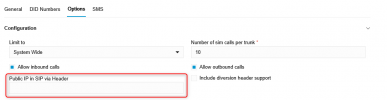
If not then it probably already downloaded. Naivgate to your trunk settings --> Options and you should see the "Public IP in SIP via Header" option there
1751387205138.png
 

Latest Posts

Forum statistics

Threads
111,990
Messages
590,161
Members
164,926
Latest member
tohoken1