Force intergration of CRM client side

Status
Not open for further replies.

Bruce Smith

Premier Customer
Joined
Mar 28, 2020
Messages
75
Reaction score
19
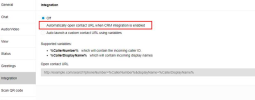
Hi, is there any way to force the client side integration to be enabled for the CRM.

Thanks.

1659963314301.png
 
No, not at the moment. This is a per-Webclient setting and is not controlled by the system.

By the way that's server-side, not client-side integrations.
 
No, not at the moment. This is a per-Webclient setting and is not controlled by the system.

By the way that's server-side, not client-side integrations.

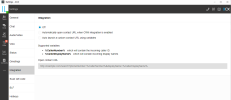
You sure its server side I have to go to the client to enable the CRM integration to get the CRM pop ups to work.

it looks client side to me
1659963963176.png

Well i see a new feature for the comming verions a policy to control setting on the end user client, replying on the end user staff to do this will be a pain.
 
By default, the option should be set to "automatically open if crm integration is enabled" (which is the server-side integration.) If it's set to Off, then someone set it that way.
 
  • Like
Reactions: TheodorosG_3CX
Just did a fresh install on a PC that never had the desktop app installed on it, the option is off by default for the CRM.
 
@Bruce Smith I want account/contact get pop-up to user when a client call-in and it is integrated with SuiteCRM. Is it possible?
 
@shubhampawar1234 Hi, that should work if the CRM supports it you will need to look at the CRM templates in 3cx and may need to make your own. i have not used SuiteCRM so I'm unable to help you there.
 
  • Like
Reactions: Evolute IT
Status
Not open for further replies.

Forum statistics

Threads
112,320
Messages
591,873
Members
165,466
Latest member
EMMEPICASA