Formatting in Caller ID

Status
Not open for further replies.

TownTech

Bronze Partner
Joined
Feb 14, 2023
Messages
107
Reaction score
12
I am in the US and a newbie.
This is what comes up as caller ID:
+18635556666:Inbound from 123-4567:All Shop Phones +1865556666
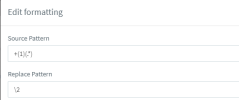
This is all I need coming in: 8635556666
Anyone know where I would fix this?
 
Also navigate to Advanced / Contacts / Options and under the option "Add Group, Queue or DID/DDI Names to Caller ID" select "Do not add".
 
  • Like
Reactions: Charles_3CX
Thx guys. I saw the guide. But I thought maybe someone could just tell me the formula for the US since I am sure there is a lot of US out there
 
Try this under the inbound option:
1681304775919.png
 
Thx.
I saw that on another post, and it had me use \1 for replace pattern.
 
I noticed in the Management Console, under SIP Trunks, I have more options, then in the web client admin.
And if I use Call Handling in web client to assign a DID, it will unassign from another area, like a ring group or a trunk.
Should I only be using the Management Console at this point?
 
Thx.
I saw that on another post, and it had me use \1 for replace pattern.
There are multiple ways to do this. You can use whatever works better for you.

I noticed in the Management Console, under SIP Trunks, I have more options, then in the web client admin.
And if I use Call Handling in web client to assign a DID, it will unassign from another area, like a ring group or a trunk.
Should I only be using the Management Console at this point?
That depends on what you want. A combination of the 2 will give you the most options at this point. For reformatting for example you need the management console. For call routing I find the Web Client better.
 
Sorry, to keep asking questions, but you are really helping me understand.
In Web Client, under Office Hours, it gives the ability when office is open to play an announcement (announcement of recorded for quality assurance), then the hold playlist is some advertising. It doesn't have the checkbox to "Play full intro prompt before calling agents", like the call queues do. So I am getting the on hold advertising playing underneath the announcement.
 
Ok the web client gives you some extra options and you can control over office hours per group. You can use the announcement and route the call to a queue and use that as well.
You can configure it as you see fit. You can route the call to a queue through the office hours menu and you can edit the Queue through the call handling menu. If you try to configure the queue you will also find the "Play full intro prompt before calling agents" option under the "Options" tab.
 
  • Like
Reactions: TownTech
Status
Not open for further replies.

Forum statistics

Threads
111,973
Messages
590,071
Members
164,892
Latest member
Phone1stStop