• We do not provide troubleshooting help for unsupported phones. Please try with a supported phone.
  • V20 Update 10 Alpha 2 Learn more

Forwarded Call is mute

Status
Not open for further replies.

Hoygen83

Bronze Partner
Advanced Certified
Joined
Apr 3, 2020
Messages
26
Reaction score
4
Hello,
can you help me find out what is happening in this scenario?
I have an incoming call from an analog line, 3CX is getting it from a Yeastar TE-100, the call arrives to an IP-Phone Yealink T41P and everything is fine (voice on both ends).
If the Yealink T41P forwards the call to another extension, wich is configured on another Yealink T41P, the phone rings, but when the call is picked up there is no voice on both ends.
All the phones are in the same network.
Might there be some misconfiguration somewhere?
Kindest Regards
 
Does the same thing happen when you forward internal to internal, or is it purely an external call thing?
 
Yes it happen also when you forward internal to internal
 
Hi,

There might be a misconfiguration possibly, let's find out.

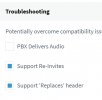
Select all your extensions, edit them and see if their options are set like so
(exclude STUN extensions if you have any - those are not relevant to this test):

1635325623211.png

1. If not, make them all the same and press ok to save then repeat your test internal to internal forwards.

2. Do not mix the gateway in the test by introducing external calls just yet - try this test only:

  • Ext A calls Ext B
  • Ext B forwards the call to Ext C

Let me know what you find
 
Unfortunately I still have the problem, perfect and clean call FROM A to B, but when B tries to turn the call to C, C rings tries to answer but mute A and Mute C
 
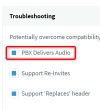
Ok let's repeat the exact same test now, and only change this option on all extensions:
1635327020955.png

Does A and C have audio in this case?
 
No , same problem
 
We may have ruled out networking issues then.

Next thing to check is the following

  1. Ensure all 3 yealinks have the correct 3CX firmware (its 36.83.0.130 for T41P)
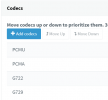
  2. Check the PBX codec order under settings > codecs. In V18 it should appear like so
    1635327754109.png
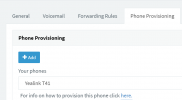
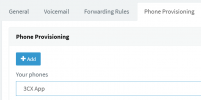
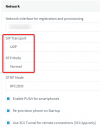
  3. Now we must also edit each of the 3 extensions individually, and check that their T41P settings are like so
    1635327903520.png
    1635327925823.png
  4. Before you press OK to save, you should also check the 3CX app settings for each of the 3 extensions:
    1635327976949.png
    1635328030157.png
  5. Now press OK to save.
  6. Reprovision your phones to make sure that any changes made to the codec order are pushed to the devices
With the above work done, we can now repeat the test A->B->C like before and see if the audio works.

Oh and juuuust in case, answer the calls using the speaker (not headset or handset) so we can eliminate any bad wires causing the issue :)
 
Everything is set up as indicated, but as soon as you press the call transfer button everything goes mute.1635330152257.png
 
Let's check one more thing to try and isolate the issue.
This will tell us if we need to focus on the hardware phones, or if the PBX might be the problem:

1. Login all 3 extensions in 3 separate webclients.

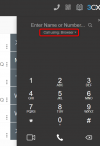
2. Make sure browser mode is selected in all 3!
1635331996518.png
3. Call *777 (one at a time) and see that all 3 can hear their echo

4. Finally, repeat the transfer test. Will the transfer work ok this way?
 
Echo Work perfect on each extension , Transfert do not work
 
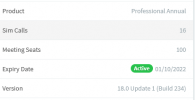
What version is your PBX, and have you tried restarting the services?
 
Yes i have try to restart services and also the
pc .

1635346466625.png
 
Hi,

You could also try making 3 brand new extensions (do not change any settings - leave them default) and repeating the webclients test if you want to have a "clean" test.

Since you can replicate the issue in this case I think you might have to open a ticket with support. You can set your logging to Verbose and restart services, then run a capture to get the whole thing in one go. Then you can end the capture and click Generate Support Information and send that file with your ticket.


PS: Remember to remove PBX Delivers Audio from the extensions we modified earlier just to return them to their normal state
 
I John's and thanks for the support , i have made a capture , how i can send you the capture ??
 
Status
Not open for further replies.

Forum statistics

Threads
112,149
Messages
590,965
Members
165,171
Latest member
Mahlon