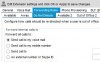
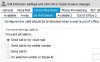
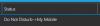
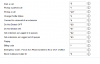
Below shows the area of the Yealink template that addresses the DND functionality in the 3CX supplied templates. If not familiar with the settings, you can get the admin manual from the Yealink site which may explain the options in more detail. There is a duplicate setting for each account as the model phone can support more than one extension/account. You also have the option of setting one of the BLF keys under the phone provisioning tab to change the status which may provide a more informative presence detail to those using presence. I assume it possible that one could be in the office physically and still have a need to be DND for a short period.
If you are provisioning the phone directly from 3CX using V14, then the parameters should be populated by whatever codes you have set for DND as the variables (%%param.....) are already set.
#######################################################################################
## DND ##
#######################################################################################
#Configure the DND key mode; 0-Phone mode (default), 1-Custom mode.
features.dnd_mode = 0
features.dnd.enable =
#Configure the DND on code and off code.
features.dnd.on_code = %%param:

IALCODEPROFILE%%2
features.dnd.off_code = %%param:
IALCODEPROFILE%%0
features.dnd.emergency_enable = 0
features.dnd.emergency_authorized_number =
#Enable or disable the DND feautre for account1; 0-Disabled (default), 1-Enabled;
account.1.dnd.enable = 0
#Configure the DND on code and off code for account1.
account.1.dnd.on_code = %%param:
IALCODEPROFILE%%2
account.1.dnd.off_code = %%param:
IALCODEPROFILE%%0
___________________________________________________________________________________________________
When I provisioned a T46, the following is what showed in the provisioning file:
#######################################################################################
## DND ##
#######################################################################################
#Configure the DND key mode; 0-Phone mode (default), 1-Custom mode.
features.dnd_mode = 0
features.dnd.enable =
#Configure the DND on code and off code.
features.dnd.on_code = *32
features.dnd.off_code = *30
features.dnd.emergency_enable = 0
features.dnd.emergency_authorized_number =
#Enable or disable the DND feautre for account1; 0-Disabled (default), 1-Enabled;
account.1.dnd.enable = 0
#Configure the DND on code and off code for account1.
account.1.dnd.on_code = *32
account.1.dnd.off_code = *30
So, on the surface, it appears that the codes were populated, but it may be that the code needs to be enabled as it shows disabled above. You can check the admin manual and then modify the enable portion of the template accordingly as there does not appear to be an issue with the codes, only perhaps with the feature being activated.