FQDN not resolving - port forward done

Status
Not open for further replies.

11111111

New User
Joined
Apr 26, 2022
Messages
8
Reaction score
1
Hello,

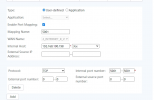
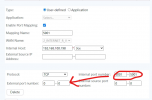
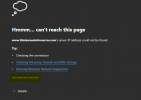
we are using latest version of 3CX, and have issue with accessing to FQDN even with port forward done. I will attach image with showing protoword, and also error message. Maybe something is wrong with router HG8145V5, where I have root access, but not quite sure what could be issue, as this is first time i have problem with FQDN.

Please instruct me what to check?

We are accessing 3cx instance via local IP 5001 port. Same is for domain, https url 5001
 

Attachments

  • Screenshot_2.png
    Screenshot_2.png
    8.2 KB · Views: 45
  • download.png
    download.png
    66.4 KB · Views: 52
Locally it's port 5000/80. HTTPS only is 5001/443.
 
Im assuming you're going to need to specify the port you're coming in on too, not just the destination?
 
Thank you for your time for reply at this thread!

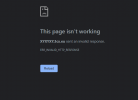
Well, as I wrote, I can access locally, but remote there is issue. As you can see on photo, error message is

MY3cx.3cx.eu sent an invalid response.
 
Last edited:
Who is your ISP and what is the router?

What is the OS?

Are you able to ues another PC to test internally behind the firewall?
 
  • Like
Reactions: Evolute IT
Makedonski Telekom AD-Skopje - HG8145V5 router

What is the OS? - esxi 6.7.0 (Build 8169922) with Debian 10 3cx latest instance

Are you able to use another PC to test internally behind the firewall? - yes i have another PC on same network, can test anything you point me to.
 
So looks like it's a huawei router? Is it a 4G router? If this is the case, it uses CGNAT which you most likely wont be able to port forwarding.

You should look at putting your instance in the cloud and using an SBC.
 
Thanks for your time. No, it is not 4G, it is standard Huawei optical router, as it use wired connection to ISP.

Cloud option is not option, as ISP use also "wired" SIP connection to hardware hosting machine. Sorry for confusing word usage :)

When I enter public IP https://www.yougetsignal.com/tools/open-ports/ and test port that is forwarded, it pass and show that port is forwarded, for example 5001.
 
As far as I can see, these must be the same and that's it.

1651070860556.png

So if it doesnt work then a) firewall on the machine isnt allowing traffic in from external network b) ISP isnt allowing. c) router is blocking traffic out. d) 5001 is being used for something else on the router
 
  • Like
Reactions: Clément Rousseau
Do you have a fixed wan address or dynamic.

Check your 3cx network settings - Settings - Network

If static - make sure 'Static Public IP' address is correct. If dynamic , tick 'Dynamic Public IP'

On a remote machine, if you run nslookup <fqdn address>, does the response match your wan ip address

What version of 3cx including build
 
to be sure its not a dns issue, please try to join your 3CX from outside directly with IP adress
and please use the setting in routeur as @kieferschild suggest.

if still not working, maybe try traceroute to debug this situation
 
  • Like
Reactions: ChrisC_3CX
As far as I can see, these must be the same and that's it.

I did try that way, without success, there is still same error,
MY3cx.3cx.eu sent an invalid response.

As you can see, something is going on 5001 port, but it is "invalid response"?

Do you have a fixed wan address or dynamic.

It is dynamic

If static - make sure 'Static Public IP' address is correct. If dynamic , tick 'Dynamic Public IP'
I did this, set up dynamic IP

On a remote machine, if you run nslookup <fqdn address>, does the response match your wan ip address

nslookup gives correct public IP. Also nslookop gives same "template" as other 3cx instance that is running on other city. So i dont see issue when comparing these two nslookup outputs.
What version of 3cx including build

18.0 (Build 461)

to be sure its not a dns issue, please try to join your 3CX from outside directly with IP adress

When i try to access with IP, got same message as with FQDN
IP:5001 sent an invalid response.


and please use the setting in routeur as @kieferschild suggest.

Yes i did, same as early. Also did try to re-install 3cx few times, every time same issue with FQDN.

if still not working, maybe try traceroute to debug this situation

As wrote above, tracroute/nslookup? of not working FQDN have same output (format) as working 3cx instance in another city.

Any info you need to check, I can share as im not quite sure what im doing wrong.
 
If the 3cx fqdn does match your wan ip address, it is either

Firewall forwarding issue - look at first part of this video


ISP routing issue on your connection
 
I wish to thank everyone. I think issue is in ISP routing, so we sent request to ISP. Once we have all info will update this thread in case anyone have similar issue.
 
  • Like
Reactions: ChrisC_3CX
Also just to clarify, the topic is in correct. The FQDN was resolving the entire time. DNS and HTTP are two entirely different protocols and the error was about an invalid HTTP response. Not resolving would look like this:

1651336565624.png

But glad you got it sorted out. These sort of issues are exactly what 3CX hosting was designed for. Simple and it just works.
 
  • Like
Reactions: ChrisC_3CX
Hello,

as mentioned I contacted ISP and indeed, issue is at ISP side. So if anyone have similar problem, especially with "IP:5001 sent an invalid response" it could be related to ISP.
 
Status
Not open for further replies.

Forum statistics

Threads
111,974
Messages
590,083
Members
164,900
Latest member
Silent_Guru