Full Cone Errors - Firewall Test on Google Cloud

Status
Not open for further replies.

Bob Denny

SOHO User
Joined
Feb 21, 2009
Messages
195
Reaction score
17
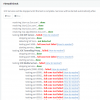
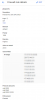
Though our phones are working fine on our PBX Express / Google Cloud, the firewall test shows many Full Cone errors. I can't tell how to mitigate these from Why the Firewall Checker Does Not Lie page under Port Forwarding. The second image below shows the firewall settings.
13810

13811
 
Do you have to specify a source IP or have you been restrictive with your firewall? I've never played with Google's Cloud.
 
Bob the errors are likely due to the source restrictions you have on the firewall rules. As everything is working I wouldn't worry about it, but if you want the green check mark you'll need to remove the source filter rules (or disable), run the firewall checker, and then re-enable them.
 
Ok, thanks for that. I will live with it. Without those source rules I would get loads and loads of auto-blacklisted IPs. Somehow the SIP bandits find our PBX. Since we only use soft phones via mobile data (Verizon) and at a few customer sites, I can keep a tight lid on access, and also control the CPU usage responding to trash attempts to register bootleg extensions, etc. If the soft phone fails to register, I run WhatIsMyIp, then create a new allow block on the Google firewall. As you can see in the blurred out image, there aren’t very many. Mostly for certain areas of Verizon mobile data, and I open them as /16 (.0.0) blocks.
 
Status
Not open for further replies.

Forum statistics

Threads
111,935
Messages
589,823
Members
164,816
Latest member
natedog