Full Cone Test Problems

Status
Not open for further replies.

Rylen

SOHO User
Joined
Aug 14, 2020
Messages
12
Reaction score
0
Hi. I'm trying to get the firewall checker to pass my setup. Please help me figure out where I'm going wrong.

I pass everything with the checker until I get to the 3CX Media Server. I pass some parts of it and then start failing. Here is the start of the log:

  • resolving 'stun-us.3cx.com'... done
  • resolving 'stun2.3cx.com'... done
  • resolving 'stun3.3cx.com'... done
  • resolving 'sip-alg-detector.3cx.com'... done
  • testing 3CX SIP Server... done
    • stopping service... done
    • detecting SIP ALG... not detected
    • testing port 5060... done
    • starting service... done
  • testing 3CX Tunneling Proxy... done
    • stopping service... done
    • testing port 5090... done
    • starting service... done
  • testing 3CX Media Server... canceled
    • stopping service... done
    • testing ports [9000..9398]... canceled
      • testing port 9000... done
      • testing port 9002... done
      • testing port 9004... done
      • testing port 9006... done
      • testing port 9008... done
      • testing port 9010... done
      • testing port 9012... done
      • testing port 9014... done
      • testing port 9016... done
      • testing port 9018... done
      • testing port 9020... done
      • testing port 9022... done
      • testing port 9024... done
      • testing port 9026... done
      • testing port 9028... done
      • testing port 9030... done
      • testing port 9032... done
      • testing port 9034... full cone test failed (How to resolve?)
      • testing port 9036... done
      • testing port 9038... done
      • testing port 9040... full cone test failed (How to resolve?)
      • testing port 9042... full cone test failed (How to resolve?)
      • testing port 9044... full cone test failed (How to resolve?)
      • testing port 9046... done
      • testing port 9048... full cone test failed (How to resolve?)
      • testing port 9050... full cone test failed (How to resolve?)
And it fails from there on out.

Relevant info:
I'm using a Netgear R6320 as my gateway router.
Port forwarding is set for 9000-10999 with UDP. (5000-5001, 5060, 5090 are also all set up.)
SIP Alg is disabled.
"Disable Port Scan and DDOS Protection" is enabled. (Meaning it should not start rejecting multiple ports being checked.) This does not visibly change the results.
I've used a port checker to poke randomly selected ports in the range. They get reported as "closed."
The machine is a Windows 10 VM in a domain managed by a Windows Server 2019.
I've looked at the Windows 10 firewall. It has a 3CX Media Server rule to allow those ports.

I appreciate the troubleshooting help.
 
The Negear R6320 is a home router. It's not meant to be used for servers.

NAT/PAT works in two directions, inbound and outbound. Port forwarding configures inbound NAT. What you may not be able to configure on the Netgear is outbound NAT.

VOIP servers require static 1 to 1 outbound NAT, while home routers tend to only support dynamic outbound NAT. VOIP clients require dynamic outbound NAT, otherwise each phone has to be configured with unique SIP and RTP ports to avoid conflicts.

More info:
https://www.3cx.com/blog/voip-howto/static-port-mappings/
https://www.3cx.com/community/threads/increment-sip-ports-with-stun-provisioning.75077/#post-339332

Might want to consider setting up an open source pfSense router:
https://www.3cx.com/docs/pfsense-firewall/
 
  • Like
Reactions: Rylen
Thanks. That provides a solid explanation of my problem.

Mostly I don't need a server level router. I've come here after having a PBX in a Flash system for a while and have a hard time picturing a scenario with 4+ simultaneous calls. Is there a good thread that talks about supported servers?
 
If the ports in the router show as being forwarded, then they should be. It is possible that the router itself has an issue.

If it were me, I would first be sure that the router has the latest firmware, then do a factory reset, and re-provision from scratch. I have used routers, in the past, that have, according to the settings, should not be behaving the way they are. Worse case scenario, borrow another router (or dig up an old one), and retest.


VOIP servers require static 1 to 1 outbound NAT, while home routers tend to only support dynamic outbound NAT. VOIP clients require dynamic outbound NAT, otherwise each phone has to be configured with unique SIP and RTP ports to avoid conflicts.
The second sentence would be applicable at a remote site, where the sets, at that location, are using STUN
 
Hi @Rylen

You might have to look into your router's documentation, it "should" be able to open those ports and forward them correctly, but not all routers are equal of course. And as always, if it has SIP ALG make sure to disable it as it can often lead to undesired effects.

It's quite important to verify that your provider can bridge you or assign the public IP to your router, along with disabling NAT and DHCP on their end to ensure that you are not being thrown off by their CPE
 
I've "solved" my problem by using a different gadget. I had a different router I wasn't using, swapped that in, configured it, and that one behaved properly.

I'm also getting a pfSense router since both of the ones above did not support my full internet speed.

Thanks for all the help.
 
Unrelated but if youre going to be using a VM I would give the debian ISO a try, it's very easy to set up and manage.
 
I'm also getting a pfSense router since both of the ones above did not support my full internet speed.

Just don't get one of the little tiny pack of cigarettes sized one, or any that are ARM CPU, they have low throughput, if your getting it direct from pfSense. Their devices are overpriced, and often if you pop the lid you will find they use extremely cheap and low grade components....

If your building your own pfSense then i can recommend several solid pieces of ready to use hardware if you like.
 
I'm getting a Netgate SG-1100. (Amazon link.) I'd rather not build something myself unless the process is pretty simple.
 
I'm getting a Netgate SG-1100. (Amazon link.) I'd rather not build something myself unless the process is pretty simple.

Did you look at the reviews? They are quite bad.

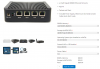
If you can handle making a bootable USB, you can get one of these, and it will be the best firewall you have ever had, and you will never have any speed issues. just install pfsense.

Amazon seems to be sold out of the 4GB RAM | 32GB SSD model, but you can get the next size up on amazon, or you can order that one directly from Protectli.

8GB RAM | 128 GB SSD
https://www.amazon.com/Firewall-Mic...ld=1&keywords=protectli&qid=1597951537&sr=8-9

Or spec it yourself from their website.
https://protectli.com/product/fw4a/

The VESA mount actually works very well as a wall mount as well. We usually mount them next to the modem/fiber connection in IT Rooms

Another bonus to these units is you dont even need a console cable, just plug in a keyboard, and vga monitor, and you can control it directly easy as cake. No messing with special USB console cables, baud rates, etc...

This is how i recommend specs wise, get a seperate access point for WiFi Needs.
1597951787078.png
 
Status
Not open for further replies.

Members Online Now

Forum statistics

Threads
111,832
Messages
589,286
Members
164,662
Latest member
DejanMDS