FXO Gateway

Status
Not open for further replies.

aalonzo

Free User
Joined
Dec 9, 2022
Messages
2
Reaction score
0
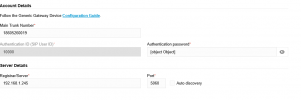
In this screen for creating a gateway (i am trying to get a GXW4108 FXO Gateway) to work. Worked fine in V18, no joy in V20. I get this screen and can not save after changing SIP password.

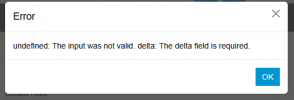
If I change it from what is showing as default below I get this error pop up:
1747061926770.png


The error above appears if I change the Autehntication password from what it show there as default....
1747061821693.png
 
Hi,

1. So you are clicking the "+Add Gateway" button to add a new one, typing in your IP and just changing the password from the default one? If not please explain in more detail.

2. What happens if you leave the default password?

3. Does your custom password use any special characters?
 
I tried it on another instance of 3CX and it worked fine. The original system, a password was not generated in the Authentication Password field, I could change the password, but 3CX would not save and gave me the pop up error shown. On the other instance, Add Gateway would create a suggested password in that field would could be used or changed and would save no problem. So, seeing that I was doing nothing wrong, I did a restart of the first system and it solved the issue. Although, I am now having issues trying to get the Grandstream GXW4108 save the registration password!!!
 
How much RAM / Disk / CPUs does you instance have assigned to it?

Sounds like some of your services were down.
 
Status
Not open for further replies.

Members Online Now

No members online now.

Forum statistics

Threads
111,832
Messages
589,286
Members
164,662
Latest member
DejanMDS