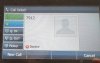
Need more info. The screenshot of the display shows a call failed and then a decline message. This implies an issue that is different from which is described as it seemingly indicates that a call was initiated by the remote extension and upon reaching 3CX, the authentication or source was incorrect and 3CX refused to service the call. There would have been no audio (no voice as dialtone may have been heard, but dialtone is generated by the phone, not 3CX).
It would be helpful to know:
1. which version of 3CX is being used?
2. Are the remote phones registered with 3CX?
3. At the 3CX site, have the required ports been forwarded and the firewall checker run and passed?
3. If registered, what happens when the remote phone dials voice mail? Do you hear the prompt?
4. What happens when the remote phone dials the echo test *777 (or your digit length), what do you hear?
5. How many phones sit behind the remote firewall and is that firewall's and/or cable modem SIP
SIP ALG/Helper been disabled?
6. Does each remote phone behind the remote firewall have its own local SIP port and RTP range so that no two phones are using the same ports?
7, Does each phone have the remote IP or FQDN plugged into the NAT IP setting for each phone?
8. Are keep alives enabled in each phone and are they set to 30 seconds or less?
9 In the SIP server IP for the account settings are you using the 3CX public IP or FQDN?