Solved Grandstream DST Timezone

Status
Not open for further replies.

Evolute IT

3CX MVP
Gold Partner
Advanced Certified
Joined
Feb 6, 2018
Messages
11,208
Reaction score
7,032
Hi,

We recently hit the DST annual crisis of checking time on phones and we hit a snap:

Our Grandstream phones (either GXP1782, GXP2140, GXP2170, etc.) all didn't update to the advanced time. But, after manually setting the timezone of each phone (under Extensions) to the GMT -5 (with DST), the clock came back alright.

My system timezone IS the GMT-5 with DST and the system time is good. Looks like mapping issue.

FYI, I am using the official supported template on the latest supported firmware.
 
Hi Frederick,

The phones shouldn't need that since they inherit the setting from the Global Timezone.

I suspect the time change might have occured after the next auto provision event, and expect they would update on the next event in this case. I can confirm they update if you reprovision via the MC (GXP-2140 tested)
 
Hi Frederick,

The phones shouldn't need that since they inherit the setting from the Global Timezone.

I suspect the time change might have occured after the next auto provision event, and expect they would update on the next event in this case. I can confirm they update if you reprovision via the MC (GXP-2140 tested)

I will try and let you know but the change was a week ago, they provision every 24h, so I can't imagine why it does that.
 
I've done one here too, gonna wait overnight to see if it changes back to the correct time
 
I've done one here too, gonna wait overnight to see if it changes back to the correct time

I just tried setting my GXP2140 to the System Timezone instead of GMT-5 DST. It came back to 10am instead of 11am.

My global timezone is GMT-5 Montreal.
 
Ok looks like the overnight provisioning took effect and the phone picked up the correct time here, switching from GMT-5 to GMT+2 correctly.

I'm wondering if in addition to the PBX's Global Timezone, you also need to check the OS timezone and locale/regional settings to make sure its passing the correct time to the PBX, which can then apply its own offset.
 
Ok looks like the overnight provisioning took effect and the phone picked up the correct time here, switching from GMT-5 to GMT+2 correctly.

I'm wondering if in addition to the PBX's Global Timezone, you also need to check the OS timezone and locale/regional settings to make sure its passing the correct time to the PBX, which can then apply its own offset.

The system time is set to GMT-5. The time is good and synced with my clock here.

Phones however still get the hour too soon like the DST never occured.
 
Are you referring to a phone provisioned with custom templates perhaps? I tested my GXP2140 here on a Debian PBX with V16 and latest firmware over PnP and SBC, its seems to follow the time change normally as soon as it gets reprovisioned either manually or overnight.

Also note if on a Windows machine: https://www.3cx.com/blog/docs/setting-windows-server-time/
 
Are you referring to a phone provisioned with custom templates perhaps? I tested my GXP2140 here on a Debian PBX with V16 and latest firmware over PnP and SBC, its seems to follow the time change normally as soon as it gets reprovisioned either manually or overnight.

Also note if on a Windows machine: https://www.3cx.com/blog/docs/setting-windows-server-time/

The machine is on Linux and no I am using the official template for these tests and all my GXP are still an hour too eary. When I set the timezone manually to GMT-5 (same as global), then it work.

It may have something to do with the mapping between the phones and the system. Like the GRANDSTREAMEXEC params (something like this)
 
Are you referring to a phone provisioned with custom templates perhaps? I tested my GXP2140 here on a Debian PBX with V16 and latest firmware over PnP and SBC, its seems to follow the time change normally as soon as it gets reprovisioned either manually or overnight.

Also note if on a Windows machine: https://www.3cx.com/blog/docs/setting-windows-server-time/

Okay so from what I can gather, my global 3CX timezone is set okay, my templates are officials and the phones is connected to NTP.

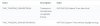
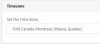
BUT, my GXP2140 AND GXP2170 has been set to GMT-5 (without DST) even when it supposed to be on. This is since the last v16 templates update.
 
See images.
 

Attachments

  • Annotation 2019-03-28 084341.jpg
    Annotation 2019-03-28 084341.jpg
    19.9 KB · Views: 14
  • Annotation 2019-03-28 084359.jpg
    Annotation 2019-03-28 084359.jpg
    8.7 KB · Views: 13
  • Annotation 2019-03-28 084426.jpg
    Annotation 2019-03-28 084426.jpg
    21.2 KB · Views: 11
  • Annotation 2019-03-28 084553.jpg
    Annotation 2019-03-28 084553.jpg
    13 KB · Views: 13
Ok, can you temporarily set your Global Timezone to -5:00 United States - Eastern Time and reprovision the phone to see if it works correctly here? (Make sure the phone ext. follows global time of course)
 
Ok, can you temporarily set your Global Timezone to -5:00 United States - Eastern Time and reprovision the phone to see if it works correctly here? (Make sure the phone ext. follows global time of course)

Strangely, it does fix the clock on the phones. Even with old custom templates of other phones (I did some test on GXV3240 and GXV3370).
 
Great news, you can keep your system on this timezone for the moment in order to preserve the correct time. When we receive the updated template from the manufacturer it will be addressed in a future update so you can use your preferred time zone.
 
  • Like
Reactions: Evolute IT
Great news, you can keep your system on this timezone for the moment in order to preserve the correct time. When we receive the updated template from the manufacturer it will be addressed in a future update so you can use your preferred time zone.

Thanks.
 
Status
Not open for further replies.

Forum statistics

Threads
111,918
Messages
589,730
Members
164,790
Latest member
Sgtpsyco