Solved Grandstream GDS3710 - HELP!

Status
Not open for further replies.

Matt Larter

New User
Joined
Oct 27, 2020
Messages
34
Reaction score
5
Hello,

So I recently installed our VOIP system with great success and everything was going well unitl I came to fit our Grandstream GDS3170. I have made all the connections and got the fobs and cards registered BUT when provisioning in 3CX it always reverts back to "NEW" status and I cannot make the outdoor unit call any phone line.

Can someone please give me some guidance of how to install properly to enable voice and video?

I have a full suite of Yealink T58's.

Thank you.
 
I checked with the T58 and it seems the GrandStream does not support any of the codec profiles that the Yealink does so I'm not confident you will ever get video between those two.
It works on Fanvil X7 (can receive video) and Webclient for sure. I can't test with a GDS but I have many GSC36xx cameras, which use the same stream engine+H264 profiles.
 
Ok at least we have voice. If you answer as video you should also have video (webclient) but if there's anything on your network equipment that messes with SIP (ie. SIP ALG / SIP Helper) you might have to disable that too.

I checked with the T58 and it seems the GrandStream does not support any of the codec profiles that the Yealink does so I'm not confident you will ever get video between those two. The Webclient however is confirmed 100% to have video working with the GrandStream.


Thanks John. Thats slightly concerning. Why would they not support a video input when they can have a web cam attached and used as a confrence call?
 
It works on Fanvil X7 (can receive video) and Webclient for sure. I can't test with a GDS but I have many GSC36xx cameras, which use the same stream engine+H264 profiles.

Thats interesting Frederick, we have a Fanvil X7 somewhere that we tested, I'll see if we still have it any test.
 
Hi Matt,

Just to clarify, I did not say they do not support video. They do of course support video, but as with all devices of this type, they need to have a common codec between them.

The manufacturer of the one device uses a chipset that can support A,B,C,etc. types of media, but so does the other manufacturer. There's nothing to say that they will both happen to support the same type of media, so I hope this point is clear.

Hence, one device may not be able to decode the doorphone video (T58) whereas another may be able to do so just fine because they share a common codec (the X7 Frederick mentioned).

The webclient though does support the GrandStream codec and I can confirm it works there.

Let me know if you have any more questions on this.
 
Hi Matt,

Just to clarify, I did not say they do not support video. They do of course support video, but as with all devices of this type, they need to have a common codec between them.

The manufacturer of the one device uses a chipset that can support A,B,C,etc. types of media, but so does the other manufacturer. There's nothing to say that they will both happen to support the same type of media, so I hope this point is clear.

Hence, one device may not be able to decode the doorphone video (T58) whereas another may be able to do so just fine because they share a common codec (the X7 Frederick mentioned).

The webclient though does support the GrandStream codec and I can confirm it works there.

Let me know if you have any more questions on this.

So after talking to Grandstream this afternoon, they advised that H264 is not active in 3CX. I have looked under the codec section of each device but it doesnt show. Can you confirm if 3CX works with H264?
 
So after talking to Grandstream this afternoon, they advised that H264 is not active in 3CX. I have looked under the codec section of each device but it doesnt show. Can you confirm if 3CX works with H264?
I can confirm as I use it everyday.

1604074037526.png

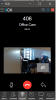
This is my GSC camera running in H264.
 
I'm now at a total loss then. The unit is now working with audio flawlessly I just dont have video.

There must be something I havent setup in 3CX or the GDS UI which is causing the issue then :(.
 
I'm now at a total loss then. The unit is now working with audio flawlessly I just dont have video.

There must be something I havent setup in 3CX or the GDS UI which is causing the issue then :(.
My guess is in the GDS. probably something to do with profile or payloads types.
 
My guess is in the GDS. probably something to do with profile or payloads types.

I've just looked in the Account settings and the Vocoder sets do not show H264 as a codec.
 
I've just looked in the Account settings and the Vocoder sets do not show H264 as a codec.

Also this is a H.264 Payload type that is set to 99?
 
Send me a screenshot of the Stream config as well. Payload 99 is correct.

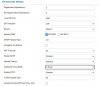
You will not see the H264 in the vocoder, as those are voice codecs. Video codecs are under the stream configuration.

You can just choose between stream 1 and stream 2 for SIP. Try using Stream 2. (in the above image)
 
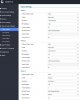
Ok so this is the Video settings.Video Settings.JPG
 
  • Like
Reactions: tronic
That's why.

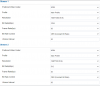
Stream 1 -> High Profile will not work in SIP. Change the other page to Stream 2, and set the framerate and I-frame interval to 30. Leave it in CBR, that's what we use for our cameras.

If you still have issues, send me a DM and I'll see what I can do.
 
This is our config (stream 1 for recording and live view, stream 2 for SIP view)

1604075312750.png

This works flawlessly.
 
Fantastic, I'm just doing a reboot of the GDS and hopefully we'll have lift off!

I didnt realise the video stream worked on mobile devices too!

Is there a way to look at the camera without logging into the UI?
 
  • Like
Reactions: Evolute IT
I didnt realise the video stream worked on mobile devices too!
It doesn't. It works with any device capable of H264. Except the 3CX Mobile App has it only supports VP8. You can use an application like IPCams on iOS to view the RTSP feed. See the admin manual for URLs and configs.

Is there a way to look at the camera without logging into the UI?
Yes, via SIP videocall or via RTSP. You can also view the MJPEG stream. See the manual in PDF and search for "stream" or "rtsp" or "mjpeg", you'll find everything you need.
 
Thank you all so much for your input. Issue solved and all working including video to Yealink T58s!

Amazing.
 
  • Like
Reactions: Evolute IT
Thank you all so much for your input. Issue solved and all working including video to Yealink T58s!

Amazing.
Glad you got it working!
 
Status
Not open for further replies.

Forum statistics

Threads
111,974
Messages
590,081
Members
164,899
Latest member
mazet