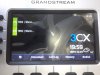
Grandstream has double entries

Status
Not open for further replies.

Zaid Hadi

Customer
Basic Certified
Joined
Dec 1, 2019
Messages
11
Reaction score
0
i just finish installing fresh copy of 3CX, and i provision 5 GXP2140 each phone with one extension like 1001, but the phone shows on its screen it is registered with two extension or it is duplicated extension like 1001 and 1001.
 

Attachments

  • photo_2019-12-01_20-00-17.jpg
    photo_2019-12-01_20-00-17.jpg
    102 KB · Views: 24
It's just 2 line keys. It's one registration, but 2 "lines".

Some phones you can change the BLFs as needed like Yealink, but some have them hardcoded in. You can do a custom template if need be.
 
  • Like
Reactions: Evolute IT
Actually it is 4 lines, but yes one registration with 2 lines (just duplicated the registration)

i have worked with BLFs but it just adding lines to the original two.

i think it is the only solution it is to change the template.
i already tried to change the template but it has too many lines and i do not know what i have to change in the template
 
I'm confused what you are asking.

I don't have a GXP2140 in front of me right now, but if I remember correctly...
If you are provisioning with the stock 3cx template, you will have 1 registration with 2 line keys.

If you want more line keys, you can add BLFs in the 3CX MC that are set to line key.

If you are asking how to provision multiple extensions to the same IP Phone, it's unsupported and you will need to use custom templates or manual provisioning.

If you are asking something else, please add more detail.
 
I don't have a GXP2140 in front of me right now, but if I remember correctly...
If you are provisioning with the stock 3cx template, you will have 1 registration with 2 line keys.
Thank you, this is my issue i have 1 registration with 2 line keys and i need it to be just one line
 
Ok, can i change the default template ? or i have to go with it and leave it like this ?
 
Ok, can i change the default template ? or i have to go with it and leave it like this ?
You can do a custom template. Stock templates are designed to be read only.

You could also remove the provisioning URL from the phone and then adjust the linekeys down to 1.
You will no longer be able to provision any new features on the phone if you do this from 3CX and will need to do it from the GUI of the phone.
 
Ok, can i change the default template ? or i have to go with it and leave it like this ?

Have you looked at the link, you will see

Known Limitations
  • The first two keys are configured as line keys (via the template), and can't be changed, otherwise the phone will not be able to make calls
  • Only the GXP2140 and GXP2170 models support the expansion modules
 
You can do a custom template. Stock templates are designed to be read only.
OK thank you, i will do a custom template and lets see i will work.
is there an easy way to do a custom template or i have to go line by line and do the needed change ?
 
i will try it and get back to you.
Many Thanks
 
Status
Not open for further replies.

Latest Posts

Forum statistics

Threads
111,934
Messages
589,822
Members
164,813
Latest member
divdigital