Grandstream HT801 for Fax

Status
Not open for further replies.

MarkTTU

Bronze Partner
Basic Certified
Joined
Feb 21, 2017
Messages
18
Reaction score
1
I'm trying to setup a Grandstream HT801 to connect to a fax machine. Following this guide: https://www.3cx.com/voip-gateways/grandstream-ht-fxs/

When setting up my FXS I can not select the fax extension (89) that I created in the Extensions tab. The only extensions that appear are the normal user extensions. Manually typing in 89 does not work. Is this guide out of date or am I missing something painfully obvious?
 
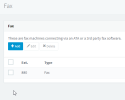
So you created an extension in the FAX menu?
1663751093794.png

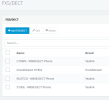
Then added your HT801 in the FXS/DECT menu?
1663751164552.png

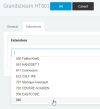
If so, it should appear in the Extension Tab of the HT801
1663751217029.png


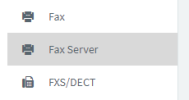
Note that the build-in "Fax Server" extension cannot be used
1663751298152.png
 
Correct. I created an extension in the Fax menu (not the fax server menu) and then add the Grandstream in the FXS menu and the newly created fax extension does not appear in the Grandstream extensions tab. I am using two digit extension numbers.
 
  • Wow
Reactions: Connexium Partner
Any regular extension can be used as a fax extension as far as I know, want to try that?
 
I wound up doing everything again creating extension 19 instead of 89. Same results, but I was able to type 19 into the drop-down/search box on the extensions tab and have it "stick" even though it still wasn't an option I could pick. Everything appears to be working now, but that dropdown still doesn't show 19 as an option.

My guess is there's a small bug in 18.0 that doesn't list two digit fax extensions in the FXS extension dropdown box.
 
Hello,
I could not replicate this issue on a v18 Update 5 Hotfix, with 2 digits extensions, is your system up-to-date? also which browser are you using?
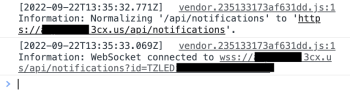
If pressing F12 / Console, then scrolling through the extensions dropdown or typing an extension number do you see any error being thrown?
 
Yes, system is running 18.0 update 5. Using Safari browser.

I used Chrome so I could access the console and it doesn't show an error.

Interestingly when I used Chrome it did not show extension 19 in the drop down. Out of curiosity I quit Chrome and then tried again and it did show extension 19 in the drop down. So then I tried Safari again and now it also shows extension 19 in the drop down.Screen Shot 2022-09-22 at 8.36.54 AM.png
 
Same exact issue here - when using 2 digit extensions, system has a bug - does not include the list of FAX extensions, only regular User extensions. If you type it in, you can get it to stick, but it's far from ideal. Took me hours to figure out what was going on - and you've identified the issue and solution here. Hopefully 3CX will resolve this moving forward.

Screen Shot 2022-10-19 at 12.48.43 PM.png

Screen Shot 2022-10-19 at 12.48.55 PM.png
 
Good to know I'm not the only one who's seen this issue. Hopefully 3CX gets this addressed in the next update.
 
Status
Not open for further replies.

Forum statistics

Threads
111,974
Messages
590,081
Members
164,899
Latest member
mazet