Grandstream HT802 ATA - Can't make outbound calls

Status
Not open for further replies.

newt

Premier Customer
Joined
Mar 29, 2019
Messages
34
Reaction score
5
Hi,

I am setting up a an HT802 gateway and are able to successfully get it provisioned. I can also dial one of the extensions assigned to an FXS port and have it work as expected. The issue is with dialing out from our DECT phone. I can't dial a local extension or a DID, it's just dead air.

I also do not see any corresponding logs in 3CX which makes me think the dial plan on the ATA is messed up.

Any insights?
 
The default dialplan in the ATA is pretty generic, and should support most digits, although you may have to wait for the 4 second timeout, before the call completes.
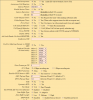
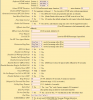
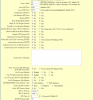
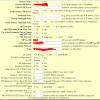
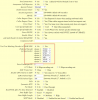
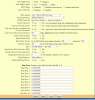
Post a shot of the page for one of the lines. X out anything sensitive, although passwords don't normally show.
 
I had a similar problem with a HT801.

Try dialling an extension followed by # to "send" immediately instead of waiting for the time out. It is easy to reduce the timeout down to 1 or 2 seconds.
 
I have tried waiting and also the # to send feature and still no luck. Just dead air.

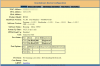
See the attached screenshots.
 

Attachments

  • Capture5.PNG
    Capture5.PNG
    73.4 KB · Views: 73
  • Capture4.PNG
    Capture4.PNG
    80.4 KB · Views: 69
  • Capture3.PNG
    Capture3.PNG
    93.4 KB · Views: 64
  • Capture2.PNG
    Capture2.PNG
    72.7 KB · Views: 57
  • Capture1.PNG
    Capture1.PNG
    86 KB · Views: 62
Is the ATA local to the server? Are you using the IP address of the server, or FQDN? Have you tried another analogue set, besides the DECT set? Do you get dialtone?
 
I do get a dialtone and I have also tried another regular phone.

It isn't local but connected over MPLS. In fact, it's on the same subnet as other working Yealink phones.
 
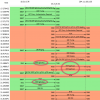
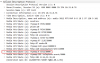
I believe I have found the issue. I started capturing the syslog output from the device and found that somehow G722 was codec being attempted to send, even though it's not even an option in the 3CX settings for the device.

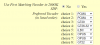
I set all of the "Preferred Vocoder" settings to PCMU and voila, it's working.

3CX team, this is an issue that should be looked into. I would create a custom template to fix this if I had access to the gateway templates... I'll have to run this set not to provision from the 3CX server.

@edossantos - tagging you just because you are name I remembered.
 
In you post of the configuration, PCMU and PCMA are the first and second choices, in the device, so unless the other end did not have those Codecs available, PCMU should have been chosen, at least, when initiating a call.
 
You are correct but unfortunately it wasn't working as it should. The negotiation must have been failing because even if it ended up choosing g722, the other endpoint supports that too so it still should have worked. The destination was not even ringing, let alone there just be audio issues.
 
Hi newt,

I'm testing a HT802 here myself with no such issues being replicated, but something doesn't seem right on yours, by default this what the PBX configures in the codecs list.

  • Mine has 7 codecs in the XML and on the device GUI - Yours has 8 for some reason
  • Mine has a yellowish backdrop, yours has a more orange backdrop, only in the codecs page

10977

I'm tempted to say we are not looking at the same device here across all screenshots, or at least not at the same firmware level.


Here's my Firmware level for reference, I would suggest using the latest firmware https://www.3cx.com/voip-gateways/grandstream-ht-fxs/#h.8hbkg7oh1qys

10979

PS: I will also update mine to the latest version if you wish to do yours too, so we can be on the same FW level
 
Update: after installing latest firmware 1.0.11.6 , it does indeed add a "choice 8" and here is what it looks like after being provisioned with default 3CX settings, the 8th choice defaulting to G722 by GrandStream when the ATA gets 7 choices in the XML none of which include G722.

10980

I made an external call and PCMU was negotiated and established on all call legs, at no point did it attempt to use a different codec while the above settings were active

10982

G722 was offered as the very last option in the list:
10983

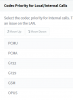
I would suggest to check the captures again, and also check MC > Settings > General > Codec Priority for Local/Internal Calls. This will govern the internal leg of the call from the ATA to the PBX. So if you only have G722 there for example, then this would be one case that would justify the behavior you mentioned as the ATA would be left with no other choice, and the PBX would offer only that codec in the SDP as proof.
 
  • Like
Reactions: Evolute IT
@JohnS_3CX Thanks you for looking into this issue.

I am on the latest firmware that you upgraded to in your second post, the orange background is just due to f.lux screwing up the shading on the screenshot.

My internal codec priority is in the screenshot below.
10989
What's odd is that the destination did not ring at all and I did not find a matching log in the activity log (using it's search in the GUI). The way I was able to see what codec was being attempted was from a syslog capture of the ATA.

I did not perform a packet cap though because normally the SIP messages should make it to the destination and still ring, just no audio if there is an RTP issue. At least that's my understanding.
 
You're welcome. A pcap should reveal whatever happened so it might be a good idea to try it as a next step :)
 
Status
Not open for further replies.

Forum statistics

Threads
111,928
Messages
589,771
Members
164,799
Latest member
RicoDinero