- Joined
- Sep 18, 2024
- Messages
- 67
- Reaction score
- 16
Hi team,
I´m trying to make work an ATA model Grandstream HT802v2, but I am having some issues with it. I was following the steps provided at https://www.3cx.com/voip-gateways/grandstream-ht-fxs/ spite that these are for v1, so I tried to do the same on v2.
I was able to update the firmware to the latest 1.0.3.10 without issue.

Nevertheless, when pasting the provisioning link created by 3CX, it seems to by installed correctly (password changed to the one created on 3CX), but the device is not up and running.
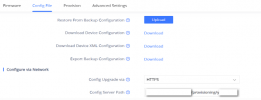
I pasted the link as you can see on the image below, save it and reboot the ATA.
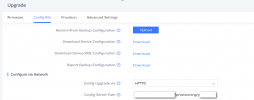
But, as you can see, it didn´t work.

Am I doing something wrong or maybe the ht802v2 isn't supported by the PBX? Is there any problem if it's v2 and not v1 (TBS are only for v1) or it should work anyway just selecting the HT802?
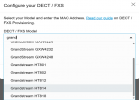
I would really appreciate any support you can guide me on this.
Sincerely,
Anthony.
I´m trying to make work an ATA model Grandstream HT802v2, but I am having some issues with it. I was following the steps provided at https://www.3cx.com/voip-gateways/grandstream-ht-fxs/ spite that these are for v1, so I tried to do the same on v2.
I was able to update the firmware to the latest 1.0.3.10 without issue.
Nevertheless, when pasting the provisioning link created by 3CX, it seems to by installed correctly (password changed to the one created on 3CX), but the device is not up and running.
I pasted the link as you can see on the image below, save it and reboot the ATA.
But, as you can see, it didn´t work.
Am I doing something wrong or maybe the ht802v2 isn't supported by the PBX? Is there any problem if it's v2 and not v1 (TBS are only for v1) or it should work anyway just selecting the HT802?
I would really appreciate any support you can guide me on this.
Sincerely,
Anthony.