Hello,
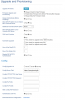
I have tried to provisioning a GXP 2160 from both of the online documentation from 3CX. The phone has the latest firmware. Provided are the screenshots
I come from FreePBX can I put in a username and password to get the phone (soon to be phones) working??
Thank you,
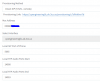
So are you saying you rebooted the phone and it didn't prompt you for a username and password? You may want to try factory resetting the phone. If you are going to try and manually provision the phone you shouldn't have the https:// part in the server path since you already specified it's a https connection in the option above that line
I don't play really do much with the GS phones but the guide says it's supposed to reboot twice and then you should get the prompt for username and password. You said the phone was on the correct firmware but you didn't mention what that was. Also, since you mention coming from Freepbx do you have a DHCP Option running perhaps that might be affecting the provisioning?
I don't play with the GS phones that much too. I like the Poloycom VVX phones. I have firmware 1.0.9.127. I am not running a DHCP option for this system.
Thank you
I would recommend downgrading the phone to the 3CX supported firmware and trying again. You can find the firmware for your phone here: https://www.3cx.com/support/phone-firmwares/
Also make sure that your https port is forwarded correctly on the PBX side as it is needed for provisioning.
.127 I believe is the correct firmware if @Dutton is running the v16 alpha/beta.
@Dutton If you try downloading the config manually does it work? It should be the the provisioning URL with cfgMAC.xml replacing the MAC with the MAC address (all lower case, no colons or dashes.
.127 I believe is the correct firmware if @Dutton is running the v16 alpha/beta.
@Dutton If you try downloading the config manually does it work? It should be the the provisioning URL with cfgMAC.xml replacing the MAC with the MAC address (all lower case, no colons or dashes.
@Dutton as @cobaltit said, remove the HTTPS from the field and try clicking the "Provision" link in the upper right corner. Also, if you are using v15, the phone should reboot twice as it will downgrade to the supported firmware. Also, make a packet capture so we can see what happens.
Also note that you will not get a User/Pass prompt if provisionning via STUN. The phone will be provided the extension you configured the phone in.