GXW4014, GXW4108 SIP Trunk creation questions

Status
Not open for further replies.

jakthree

Free User
Joined
Feb 8, 2019
Messages
124
Reaction score
18
Hi,
3CX 15.5.15502.6
Grandstream GXW4108 gateway firmware 1.4.1.5.
Example PSTN analog (copper) 10 digit phone numbers
7776661111 (primary phone number plugged into GXW's FX01 port)
7776662222 (second FX02)
7776663333 (third FX03)
7776664444 (fourth FX04)

Reference: https://www.3cx.com/voip-gateways/grandstream-fxo/
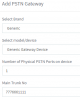
Step 2-1: General - Trunk Details - Main Trunk No:
Q1. Based upon my above example phone numbers, Should the Main Trunk No be set to 0017776661111?
Q2. If that is correct, then what is purpose of 001?

Step 2-2: Options - PSTN Gateway Options - Device MAC address:
I am guessing that the MAC address is used during Step 2-3: Generate Device Config.

Q3. Is the MAC address used for any other 3CX functions such as checking a packet for correct MAC address, checking MAC during GXW registration... other?

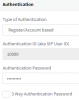
During creation of the SIP trunk, Note that the SIP User ID is set to 10000
9551

After the GXW reboots and is GXW provisioned by the above created config file.
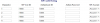
The first 4 channel User Accounts are
9550

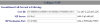
Unconditional Call Forward to Following - User ID is set
9552
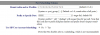
Notice that there are six '0' zeros. 'ch1: 000000'
9553

Notice the Prefix to Specify Port is five '0' zeros '00000'
Why was the Prefix to Specify Port set to '00000' instead of leaving it '99'?
Is the prefix used somewhere in an Inbound route?
Is the Prefix used as a prepend in an outbound route?

Step 6: Inbound Rules
'Analog lines (FXO) can present the calling number but not the called number.'.
Example: A call from 4445555 come in on FX01 (7776661111)
What is the 'calling number'?
What is the 'called number'?

In Step 2 - Add device, the Main Trunk No was set to 0017776661111.
In Step 6 - Create those DID's
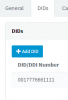
Before adding DIDs, there is already a DID equal to the Main Trunk No in the list.
9554
You cannot delete 0017776661111 from the list. You can add '000000' (six zeros), '000001'... to the list.

Referring back to Q1, What should the Main Trunk No be set to?

Thank you,
 
  • Like
Reactions: JPoro
Did you have a read through this?

https://www.3cx.com/voip-gateways/grandstream-fxo/

Because PSTN gateways cant handle true DIDs, it uses the information that you have put in to define the individual trunk numbers (true PSTN number assigned to each line). This is all well and good if callers dial each number as an individual line, you can then route line 2, for example, to one extension using the DID rules. many users purchase a hunt group from the PSTN provider.In that case, callers on;t call the "main" number and calls will overflow to all incoming lines. In that case there is no point in using DID rules at all.

Grandstream is one of the makes of gateways that allows callers to select which trunk (PSTN line) of the gateway that they want the call to go out on by using a prefix (not all gateways do).
There are a number of sites that provide more information about manually setting up the gateway, which while not 3CX supported, allows , perhaps, more flexibility, for your particular requirements. The 3CX forum also has additional posts about using that gateway, if you do a search.

https://wiki.freepbx.org/display/FO...ream+GXW-410X+Device+to+act+as+an+FXO+Gateway
 
This configuration worked to allow me to have one 3cx trunk (SIP gateway) for each FXO port. I am not an expert. I cannot answer question about your specific configuration. Use at your own risk.

3CX v15.5.15502.6 Trunk setup.
SIP Trunks - Add gateway
Select Generic
Select Generic Gateway Device
Number of Physical PSTN Ports on device: 1
Main trunk No: example 7776661111 (the 10 digit phone number of the copper PSTN line that will be plugged into the FXO's port)
9661
Use all default settings except for below
General tab - Trunk Details
Enter name for Trunk: GXW-01-FX01 (100xx:5060:1111)
Trunk naming format: GXW FXO port (3CX user ID:port number:last four digits of phone number)

Registrar/Server/Gateway Hostname or IP: xxx.xxx.xxx.xxx : 5060 (enter the IP address and port of the GXW)
Important: for FX01 enter port 5060, for FX02 enter port 5062, FX03 = 5064...
Number of SIM Calls: 1 (there is only one simultaneous call per PSTN line on GXW)
Number of Physical PSTN Ports on device: 1
General tab - Authentication
Authentication ID (aka SIP User ID): created by 3CX not editable. Example 10000.
Authentication Password: write down the password or copy to clipboard
This ID and password will be used latter when setting up the GXW410x User Account
General - Route calls to
Main Trunk No: 7776661111
Destination for calls during office hours: Extension, choose an extension
Destination for calls outside office hours: Extension, choose an extension
DIDs tab - DID/DDI Number: 7776661111 (this may fill in automatically when Main Trunk number is entered)
Click OK to create/save the SIP trunk
Create a new trunk (Generic Gateway) for each FXO port. I created three more
GXW-FX02 - User ID 10001 - port 5062
GXW-FX03 - User ID 10002 - port 5064
GXW-FX04 - User ID 10003 - port 5066

Grandstream GXW-410x with 1.4.1.5 firmware
The 3CX Generic Gateway does not create a provisioning file. Manually configure the GXW-410x.
Factory default the GXW-410x - default settings are used except where mentioned below
Accounts - Account 1
General Settings
Account name: To 3CX
SIP Server: yyy.yyy.yyy.yyy:5060 (IP address of 3CX PBX)
Outbound Proxy: yyy.yyy.yyy.yyy:5060
Network Setting: defaults
SIP Settings
SIP Registration: Yes
Unregister On Reboot: No
Register Expiration: 1
SIP Reg Failure Retry Wait: 10
Audio Settings: defaults
Call Settings: defaults
User Account
SIP User ID: 10000 (the 3CX Authentication ID you wrote down)
Authenticate ID: 10000
Authenticate ID: ? (the 3CX Authentication password)
SIP Account: Account 1
I added three more User Accounts to match the trunks (gateways) created above
9662

Settings
Call Settings
Voice Frames per TX: 2 (change if you need to)
Channels Settings
DTMF Methods(1-7): ch1-8:2;
Unconditional Call Forward to Following:
User ID: ch1:7776661111;ch2:7776662222;ch3:7776663333;ch4:7776664444;ch5-8:;
(enter your 10 digit phone number of the PSTN line plugged into the FX01 thru FX04 ports)
SIP Server: ch1-8:p1;
SIP Destination Port: ch1-8:5060;
T.38 Settings: ch1-8:mode=1,rate=9600,ecm=1; (I don't fax thru the GXW so I don't know if this works)
Networks
Basic settings - configure for your network. I suggest a static IP
IP Address: xxx.xxx.xxx.xxx (IP address of the GXW)
Advanced Settings
Layer 3 QoS: 48 (worked for me, change if you need something different)
Date & Time: defaults
Maintenance
Upgrade/Provisioning
Config Server Path: do.not.change (I entered 'do.not.change' so that GXW will not accidentally provision)
Automatic Upgrade: No
Always Check for New Firmware: checked
Authenticate Conf File: No
FXO Lines
Settings
Number of Rings Before Pickup: 2
Dialing
Stage Method(1/2): ch1-8:1; (important 1 is single stage dialing)
Round-robin and/or Flexible: rr:1;rr:2;rr:3;rr:4;rr:5;rr:6;rr:7;rr:8;
Outgoing Call Dial Plan: {[*x]+}

Save and Reboot the GXW, login and check Status - Account status (may have to refresh the screen a couple times to allow for registration to complete)
Confirm that the User Accounts - SIP Registration show "Yes"
Confirm 3CX SIP Trunks show green dot

Setup an Inbound route for each channel set in User ID field.
Inbound Route One
General DID/DDI: 7776661111 (or matching PSTN line number assigned is User ID field)
Route calls to: Extension (or group...)
Inbound Route Two
General DID/DDI: 777666222
Route calls to: Extension (or group...)
Inbound Route Three
General DID/DDI: 7776663333
Route calls to: Extension (or group...)
Inbound Route Four
General DID/DDI: 7776664444
Route calls to: Extension (or group...)

Setup Outbound route(s)
Outbound Route
Make outbound calls on: Route 1 GXW-01-FX01 (100xx:5060:1111)

If this config works for you then post a reply. If you have to make some changes to make it work then post them as well.
Thank you
 
Last edited:
Status
Not open for further replies.

Forum statistics

Threads
111,914
Messages
589,712
Members
164,785
Latest member
Texas Clay -