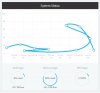
Solved HALP! My System Status Graph is Doing Somersaults and/or Time Travel. (Screenshot Attached)

Status
Not open for further replies.

kruso.tech

Customer
Basic Certified
Joined
Aug 13, 2020
Messages
6
Reaction score
2
What in the world is going on here? This is a brand new install of the 3CX Debian ISO on WS2019 Datacenter. I had 3CX running on my old ESXi server without problems.
1.jpg
 
amount of memory seems very low no?
 
  • Like
Reactions: kruso.tech
I noticed that too. Apparently it doesn’t work well with dynamic memory. I turned dynamic memory off and increased the RAM to 2GB. Still having the same problem.
 
Since you mentioned Server 2019 Datacenter are you using ESXi or Hyper-V?
 
  • Like
Reactions: nub
It would probably be best to use a process manager like top to see what is spiking the resources.
 
When that graph was made, the hypervisor was only allocating 512MB to the machine. I have since given it 2GB, and I’m still having the time travel issue. I don’t think it’s a resources issue.
 
never seen a case like yours, we discover something, :p ;)
 
  • Like
Reactions: kruso.tech
What in the world is going on here? This is a brand new install of the 3CX Debian ISO on WS2019 Datacenter. I had 3CX running on my old ESXi server without problems.

View attachment 17709
TimeMachine edition ? :)))
Lokks like NTP was adjusting a local time...
 
Hi,

It looks like the clock of the machine is changing, that would be enough to explain the graph.

You should look into NTP section of the guide posted above, and also ensure that the hypervisor is not doing anything weird with the time sync.
 
  • Like
Reactions: kruso.tech
  • Like
Reactions: JohnS_3CX
No worries, glad to hear it was resolved!
 
Status
Not open for further replies.

Forum statistics

Threads
112,322
Messages
591,886
Members
165,470
Latest member
Robert Lee