Handset showing old user name

RobColver

Customer
Basic Certified
Joined
Sep 9, 2022
Messages
81
Reaction score
18
3CX V20 Update (Build 724 Release)
Yealink W70B base station with just one W53H handset
Connected via Yealink T54W configured as a router phone

Two usernames changes a few weeks ago. W53H handset still displays old usernames which no longer exist in 3CX. 3CX call log shows correct (i.e. new) usernames. Handset shows wrong usernames.

Sounds like the old usernames are being cached somewhere.

Have tried factory resetting the base station and reprovisioning. Also reset the handset (via Settings > System Settings > Handset reset). Problem persists.

When doing the Handset reset, I was not prompted for a PIN which slightly surprised me but it said the reset was successful. After the Handset reset, I was expecting to have to re-pair the handset with the base but that wasn't necessary. This makes me wonder if the Handset reset actually worked at all?

Any suggestions?
 
When you log in to the GUI on the base, what accounts are registered?
 
Hello RobColver,

There are 2 things here.
The provisioning from the 3CX, containing name and SIP account details.
And the connection handset and the DECT based on RFPI / IPUI, this does NOT get passed to the 3CX and does stay in the Basestation.

Reading your story, if the handset does still have the ´old´ name, than the Basestation did not get the provisioning from the 3CX server.
Try to enforce an provisioning from the Basestation webpage, or try to download the link yourself to check to provisioning link from the 3CX server.

Paulo
 
Two usernames changes a few weeks ago. W53H handset still displays old usernames which no longer exist in 3CX. 3CX call log shows correct (i.e. new) usernames. Handset shows wrong usernames.
3CX did not provision those Handset Names. We provision the extension number on the W70B as you can see below.

So if you see names there, it means somebody typed them in manually after provisioning.

1760356537618.png
 
  • Like
Reactions: paulodagraca
I'm no longer on site and don't have remote access so I can't be 100% sure but I'm fairly certain there's just one account as a I factory reset the base and reprovisioned it and there's only one user/handset associated with it in 3CX.
 
3CX did not provision those Handset Names. We provision the extension number on the W70B as you can see below.

So if you see names there, it means somebody typed them in manually after provisioning.

View attachment 49708
Hi John

The base station was factory reset (via the base station's webUI). I then logged on using admin/admin (which proved to me that the reset had worked) and then reprovisioned manually using the 3CX provisioning URL.

The 2 "wrong" usernames are not associated with handsets connected to this base station. They're connected via 2 entirely separate base stations
 
If I impersonate the callee using the 3CX web/admin client, the correct username is shown in the Web client but, on that same call, the old username is shown on the handset. Definitely sounds like a base station or handset issue. I have checked the local/personal address book and it is empty. The company address book contains the correct usernames and does not contain the old username . I can't work out where the old usernames are being cached!
 
Hello RobColver,

This is the name of the caller, and can be an phonebook entry in the Handset.
Please check handset phonebook for name/extention.

Paulo
 
Just to be clear, are you talking about the label that appears on the handset when its idle? ie. it shows 100

Or do you mean when for example user 200 calls 100, instead of showing "John" is ringing you, we see an old name that "Chris" is ringing you? ie. the incoming caller ID.
 
Hello RobColver,

This is the name of the caller, and can be an phonebook entry in the Handset.
Please check handset phonebook for name/extention.

Paulo
Hi Paulo

I have already done that and the phonebook only contains the correct names - it does not contain the wrong names.
Just to be clear, are you talking about the label that appears on the handset when its idle? ie. it shows 100

Or do you mean when for example user 200 calls 100, instead of showing "John" is ringing you, we see an old name that "Chris" is ringing you? ie. the incoming caller ID.
Hi John

It is the latter. The caller's name is wrong. Sorry I didn't make that clear earlier.
 
  • Like
Reactions: JohnS_3CX
If not updated, ensure first you have the correct firmware from here

Then please try the below in this specific order:

1. Delete the handsets from the base
2. Factory Reset the base
3. Reprovision the base
4. Assign the handsets again

Guide is here: https://www.3cx.com/sip-phones/yealink-dect-phones/

This should ensure that the base downloads the latest phonebook from 3CX.

PS: the base reloads the phonebook every 6 hours by default. You can confirm the phonebook's current contents by pasting your provisioning URL followed by /yealink_phonebook.xml in a browser.
 
  • Like
Reactions: RobColver
The phonebook is correct (both on the handset and using the browser link you sent me). I will try the 4 step procedure you recommend and let you know what happens.
 
  • Like
Reactions: JohnS_3CX
I have performed all of the steps but the handset still displays the old (wrong) CallerID for two users. Calls from those two users to other extensions display the new (correct) CallerID.

I'm convinced the problem lies with the Yealink W56H handset itself. Is there a way to factory reset it? I have tried doing the Handset Reset available through the handset's UI but this didn't help.

I have checked that the local phonebook is empty and the 3CX phonebook contains the correct data.
 
Hi Rob,

There's one more thing you can do to remove all doubt:

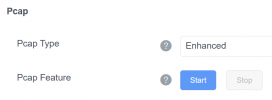
1. Login to the base, Settings > Configuration > Start an Enhanced PCAP
1760969223469.png

2. Send a call to the affected handset answer briefly, and quickly hang up

3. Stop the PCAP and now you will have a capture file downloaded you can open in Wireshark

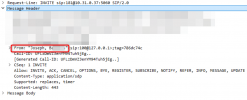
4. Look at the INVITE to confirm if the correct name arrived from 3CX in From: field
1760969439357.png
In this case, I am 181 and got a call from "Joseph B." from 100.

This should remove any doubt that 3CX is sending the wrong name.

If so, you can open a ticket with Yealink to help assist further as in my case, I cannot replicate this behavior - as soon as I change a name it will show the new name when the next call arrives.
 
  • Like
Reactions: KyriacosS_3CX
Many thanks for your assistance @JohnS_3CX I will try this - however I'm already convinced that 3CX is sending the correct information since every other extension shows the correct CallerID and even the webclient for the user (the one who sees the wrong CallerID on their Yealink handset) shows the correct CallerID. I suspect the old ID is being cached by the Yealink but I have done a factory reset on the base and also done a Handset Reset (although I'm not convinced that really worked). I'll try it with a different handset.
 
Might still be worth opening a case with their Support though, if there is indeed some rare issue it can at least be documented and hopefully patched in their next firmware release ;)
 

Forum statistics

Threads
111,954
Messages
589,921
Members
164,852
Latest member
priya