Hard- and softkeys provisioning Yealink T58

Status
Not open for further replies.

wsgmenden

Free User
Joined
Nov 17, 2020
Messages
3
Reaction score
0
Hi guys,

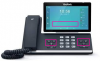
does anybody know how to add support for the soft- and hard keys of Yealink T58's DSS Key setup to provisioning templates?
Nothing to find in the standard templates :-(

Thank you and regards
Tim

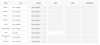
1605644299540.png
 
You add the blf key settings under extension , blf tab

https://www.3cx.com/sip-phones/busy-lamp-field-dss-keys/

After making the changes, click on reprovision tab, which will update the phone.\

End users can also make the own settings using the webclient and windows 3cx application
 
thanks but I dont mean the BLF keys, I mean the softkeys (Android) of T58 that I can configure in the phones own menu and the hard keys on the phone (same menu).
 
3CX does not support changing/configuring those via the management console/stock template.
 
Status
Not open for further replies.

Latest Posts

Forum statistics

Threads
111,990
Messages
590,164
Members
164,926
Latest member
tohoken1