- Joined
- May 16, 2025
- Messages
- 2
- Reaction score
- 2
I'm looking for guidance on how to disable two-factor authentication (2FA) via SSH from the console, either for the admin user or globally for all users.
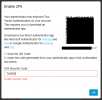
Currently, when attempting to reset the admin password, the process gets stuck in a loop requiring 2FA setup. Scanning the QR code or manually entering the key into an authenticator app both appear to work, but the system keeps reporting an “invalid code” during validation and won’t allow the reset to continue.
I do have root access to the Debian server where this on-premise system is hosted, but I’ve been unable to locate any authentication configuration files that control or disable 2FA.
If anyone has encountered this or can point me toward the relevant files or steps to bypass or disable 2FA temporarily, I’d greatly appreciate the help.
Thanks in advance!
Currently, when attempting to reset the admin password, the process gets stuck in a loop requiring 2FA setup. Scanning the QR code or manually entering the key into an authenticator app both appear to work, but the system keeps reporting an “invalid code” during validation and won’t allow the reset to continue.
I do have root access to the Debian server where this on-premise system is hosted, but I’ve been unable to locate any authentication configuration files that control or disable 2FA.
If anyone has encountered this or can point me toward the relevant files or steps to bypass or disable 2FA temporarily, I’d greatly appreciate the help.
Thanks in advance!